<?xml version="1.0" encoding="UTF-8" ?>
<rdf:RDF
  xmlns:rdf="http://www.w3.org/1999/02/22-rdf-syntax-ns#"
  xmlns="http://purl.org/rss/1.0/"
  xmlns:dc="http://purl.org/dc/elements/1.1/"
  xmlns:content="http://purl.org/rss/1.0/modules/content/">

  <channel rdf:about="https://win8.no-mania.com/RSS/100/">
    <title>windows10の人柱になってみる</title>
    <link>https://win8.no-mania.com/</link>
    <atom10:link xmlns:atom10="http://www.w3.org/2005/Atom" rel="self" type="application/rss+xml" href="https://win8.no-mania.com/RSS/" />
    <atom10:link xmlns:atom10="http://www.w3.org/2005/Atom" rel="hub" href="http://pubsubhubbub.appspot.com/" />
    <description></description>
    <dc:language>ja</dc:language>
    <dc:date>2025-07-24T22:32:43+09:00</dc:date>
    <items>
    <rdf:Seq>
      <rdf:li rdf:resource="https://win8.no-mania.com/usb_over_current/usb_device_over_current" />
      <rdf:li rdf:resource="https://win8.no-mania.com/windows11/windows11_tpm2" />
      <rdf:li rdf:resource="https://win8.no-mania.com/windows10/win10pro_license" />
      <rdf:li rdf:resource="https://win8.no-mania.com/ssd/ssd_samsungssd_weight" />
      <rdf:li rdf:resource="https://win8.no-mania.com/ssd/ssd_dynabook_samsungmagician" />
      <rdf:li rdf:resource="https://win8.no-mania.com/ssd/ssd_dynabook5" />
      <rdf:li rdf:resource="https://win8.no-mania.com/ssd/ssd_dynabook4" />
      <rdf:li rdf:resource="https://win8.no-mania.com/ssd/ssd_dynabook3" />
      <rdf:li rdf:resource="https://win8.no-mania.com/ssd/ssd_dynabook2" />
      <rdf:li rdf:resource="https://win8.no-mania.com/ssd/ssd_dynabook1" />
    </rdf:Seq>
    </items>
  </channel>

  <item rdf:about="https://win8.no-mania.com/usb_over_current/usb_device_over_current">
    <link>https://win8.no-mania.com/usb_over_current/usb_device_over_current</link>
    <title>USBデバイスの過電流エラーから復旧できた件</title>
    <description>
    amzn_assoc_ad_type = &amp;quot;link_enhancement_widget&amp;quot;;
    amzn_assoc_tracking_id = &amp;quot;diyratio-22&amp;quot;;
    amzn_assoc_linkid = &amp;quot;3fcdb6b26d9c8792c75780c57455...</description>
    <content:encoded><![CDATA[<script async="" src="https://pagead2.googlesyndication.com/pagead/js/adsbygoogle.js?client=ca-pub-9590588813454524" crossorigin="anonymous" type="text/javascript"></script>
<script type="text/javascript">    amzn_assoc_ad_type = "link_enhancement_widget";
    amzn_assoc_tracking_id = "diyratio-22";
    amzn_assoc_linkid = "3fcdb6b26d9c8792c75780c57455185a";
    amzn_assoc_placement = "";
    amzn_assoc_marketplace = "amazon";
    amzn_assoc_region = "JP";</script>
<script src="//ws-fe.amazon-adsystem.com/widgets/q?ServiceVersion=20070822&amp;Operation=GetScript&amp;ID=OneJS&amp;WS=1&amp;MarketPlace=JP" type="text/javascript"></script>
<div style="overflow-x: auto;"><iframe width="560" height="315" src="https://www.youtube.com/embed/Q0FC2Rt3QzI?si=eR2Q7pNQSiHKT7zS" title="YouTube video player" frameborder="0" allow="accelerometer; autoplay; clipboard-write; encrypted-media; gyroscope; picture-in-picture; web-share" referrerpolicy="strict-origin-when-cross-origin" allowfullscreen=""></iframe><br />
<br />
<span color="0000ff" style="color: #0000ff;">Over Current Have Been Detected On Your USB Device!! <br />
System will shutdown after 15 seconds to protect your mainboard!!</span><br />
<br />
1年くらい前から、&uarr;の様なメッセージが出て<br />
PCを起動できないことが頻発するようになった。<br />
<br />
google先生に翻訳してもらうと<br />
どうやらUSBデバイスの過電流からの保護のようだのだが<br />
<br />
とある方法（&uarr;動画）で復旧できたのである！<br />
<br />
&darr;キーアイテム。<br />
<br />
<a href="https://hb.afl.rakuten.co.jp/ichiba/4aa7ad2a.d0a96bea.4aa7ad2b.7b52c537/?pc=https%3A%2F%2Fitem.rakuten.co.jp%2Fshoppress%2Fsz001%2F&amp;link_type=pict&amp;ut=eyJwYWdlIjoiaXRlbSIsInR5cGUiOiJwaWN0Iiwic2l6ZSI6IjMwMHgzMDAiLCJuYW0iOjEsIm5hbXAiOiJyaWdodCIsImNvbSI6MSwiY29tcCI6ImRvd24iLCJwcmljZSI6MSwiYm9yIjoxLCJjb2wiOjEsImJidG4iOjEsInByb2QiOjAsImFtcCI6ZmFsc2V9" target="_blank" rel="nofollow sponsored noopener" style="word-wrap: break-word;"><img src="https://hbb.afl.rakuten.co.jp/hgb/4aa7ad2a.d0a96bea.4aa7ad2b.7b52c537/?me_id=1380821&amp;item_id=10002854&amp;pc=https%3A%2F%2Fthumbnail.image.rakuten.co.jp%2F%400_mall%2Fshoppress%2Fcabinet%2Fusb%2Fsz001_01.jpg%3F_ex%3D300x300&amp;s=300x300&amp;t=pict" border="0" style="margin: 2px;" alt="" title="" /></a><br />
<br />

<script async="" src="//pagead2.googlesyndication.com/pagead/js/adsbygoogle.js" type="text/javascript"></script>
<!-- 忍者ブログ四角（小） --> <ins class="adsbygoogle" style="display: inline-block; width: 300px; height: 250px;" data-ad-client="ca-pub-9590588813454524" data-ad-slot="3378225444"></ins>
<script type="text/javascript">(adsbygoogle = window.adsbygoogle || []).push({});</script>
<br />
<br />
</div>]]></content:encoded>
    <dc:subject>USB過電流エラー</dc:subject>
    <dc:date>2025-07-24T22:32:43+09:00</dc:date>
    <dc:creator>No Name Ninja</dc:creator>
    <dc:publisher>NINJA BLOG</dc:publisher>
    <dc:rights>No Name Ninja</dc:rights>
  </item>
  <item rdf:about="https://win8.no-mania.com/windows11/windows11_tpm2">
    <link>https://win8.no-mania.com/windows11/windows11_tpm2</link>
    <title>【Windows11】TPM2.0問題の解決方法（AMD/MSIの場合）</title>
    <description>    amzn_assoc_ad_type = &amp;quot;link_enhancement_widget&amp;quot;;
    amzn_assoc_tracking_id = &amp;quot;diyratio-22&amp;quot;;
    amzn_assoc_linkid = &amp;quot;3fcdb6b26d9c8792c75780c574551...</description>
    <content:encoded><![CDATA[<script type="text/javascript">    amzn_assoc_ad_type = "link_enhancement_widget";
    amzn_assoc_tracking_id = "diyratio-22";
    amzn_assoc_linkid = "3fcdb6b26d9c8792c75780c57455185a";
    amzn_assoc_placement = "";
    amzn_assoc_marketplace = "amazon";
    amzn_assoc_region = "JP";</script>
<script src="//ws-fe.amazon-adsystem.com/widgets/q?ServiceVersion=20070822&amp;Operation=GetScript&amp;ID=OneJS&amp;WS=1&amp;MarketPlace=JP" type="text/javascript"></script>
<img src="//win8.no-mania.com/File/221017b1.jpeg" alt="" width="560/" /><br />
<br />
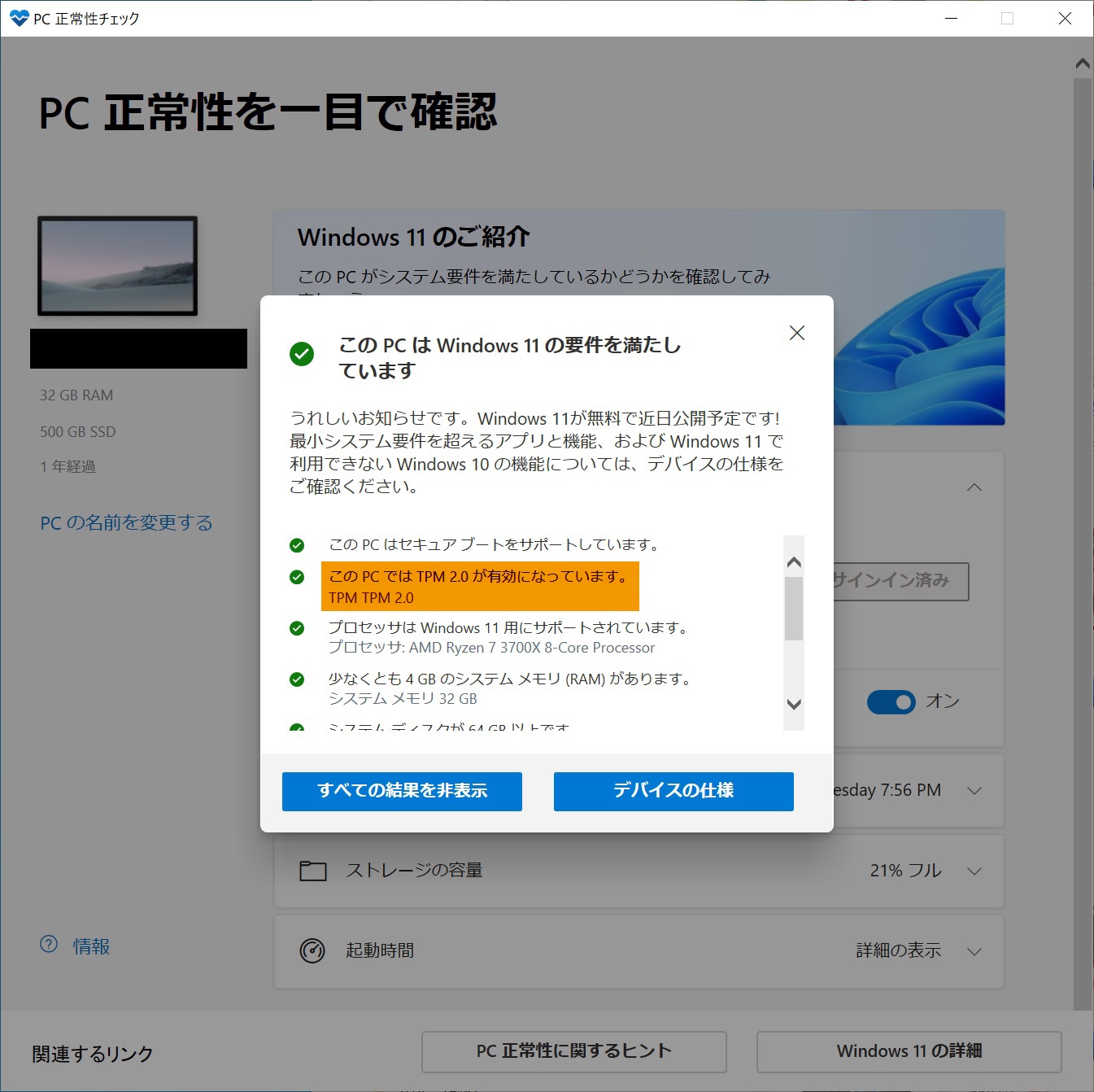
自分のPCがWindows11に互換性があるかチェックして<br />
TPM2.0が引っかかった人も多い？！と思います。<br />
<br />
私も2020年7月に自作PCを組んで<br />
互換性チェックでTPM2.0が引っかかりました。<br />
<br />
いろいろ調べていると<br />
どうやらBIOSの設定で有効化できるとのこと。<br />
<br />
&darr;ページ中段の「PC 正常性チェック アプリのダウンロード」からダウンロード<br />
<a href="https://www.microsoft.com/ja-jp/windows/windows-11" title="" target="_blank"><span style="text-decoration: underline;">windows11の互換性の確認</span></a><br />

<script async="" src="//pagead2.googlesyndication.com/pagead/js/adsbygoogle.js" type="text/javascript"></script>
<!-- 忍者ブログ四角（小） --> <ins data-ad-slot="3378225444" data-ad-client="ca-pub-9590588813454524" style="display: inline-block; width: 300px; height: 250px;" class="adsbygoogle"></ins>
<script type="text/javascript">(adsbygoogle = window.adsbygoogle || []).push({});</script>
<br />
<br />
<img src="//win8.no-mania.com/File/win11_d.jpg" alt="" width="560/" /><br />
<br />
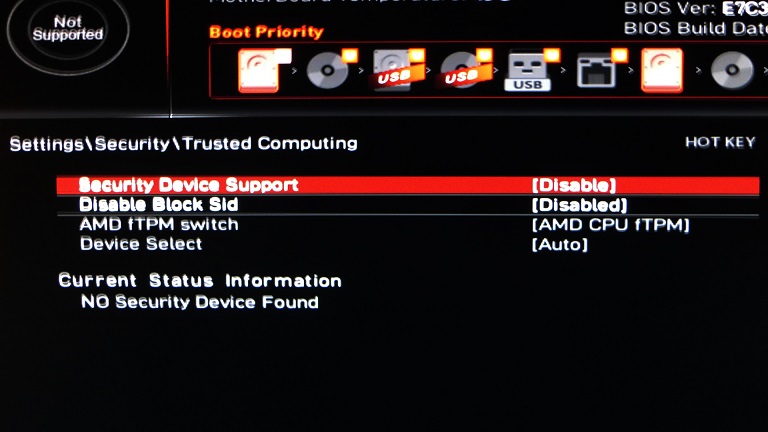
早速、再起動してF11連打でBIOS画面に入り<br />
Setting&rarr;Security&rarr;Trusted Computingに移動すると<br />
写真では分かりづらいですが<br />
AMD fTPM switchが灰色（無効）になっています。<br />
<br />
<img src="//win8.no-mania.com/File/win11_e.jpg" alt="" width="560/" /><br />
<br />
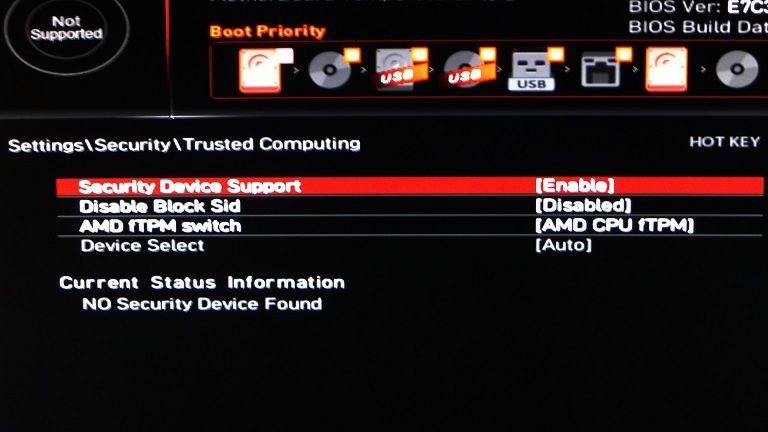
そこでSecurity Device Supportを<br />
Disable（無効）からEnable（有効）にすると<br />
AMD fTPM switchが白色（有効）になります。<br />
<br />
あとは設定を保存して再起動すればOK。<br />
<br />
Windows10からWindows11へは<br />
2021/10/05から無償アップグレード予定ですが<br />
Windows7/8/8.1からWindows10への<br />
無償アップグレードが期間限定だったので<br />
早めに無償アップグレードした方がいいかも知れません。<br />
<br />

<table frame="void">
<tbody>
<tr>
<td style="border: none;" valign="bottom"><a target="_blank" href="https://www.amazon.co.jp/gp/product/B013I9SWMC/ref=as_li_tl?ie=UTF8&amp;camp=247&amp;creative=1211&amp;creativeASIN=B013I9SWMC&amp;linkCode=as2&amp;tag=diyratio-22&amp;linkId=750074a22c250458afe1295f7d8bef9b"><img border="0" src="//ws-fe.amazon-adsystem.com/widgets/q?_encoding=UTF8&amp;MarketPlace=JP&amp;ASIN=B013I9SWMC&amp;ServiceVersion=20070822&amp;ID=AsinImage&amp;WS=1&amp;Format=_SL250_&amp;tag=diyratio-22" /><br />
<span style="text-decoration: underline;">Windows10 Home</span></a></td>
<td style="border: none;" valign="bottom"><a target="_blank" href="https://www.amazon.co.jp/gp/product/B013I9T4LU/ref=as_li_tl?ie=UTF8&amp;camp=247&amp;creative=1211&amp;creativeASIN=B013I9T4LU&amp;linkCode=as2&amp;tag=diyratio-22&amp;linkId=df842534368e695a114e83abdd8b69e1"><img border="0" src="//ws-fe.amazon-adsystem.com/widgets/q?_encoding=UTF8&amp;MarketPlace=JP&amp;ASIN=B013I9T4LU&amp;ServiceVersion=20070822&amp;ID=AsinImage&amp;WS=1&amp;Format=_SL250_&amp;tag=diyratio-22" /><br />
<span style="text-decoration: underline;">Windows10 Pro</span></a></td>
</tr>
</tbody>
</table>
<br />

<script type="text/javascript">rakuten_design="slide";rakuten_affiliateId="00443c99.09d38f51.058c51e0.9c8f10e0";rakuten_items="tra-ranking";rakuten_genreId="tra-allzenkoku";rakuten_size="600x200";rakuten_target="_blank";rakuten_theme="gray";rakuten_border="off";rakuten_auto_mode="on";rakuten_genre_title="off";rakuten_recommend="on";rakuten_ts="1633436829024";</script>
<script type="text/javascript" src="https://xml.affiliate.rakuten.co.jp/widget/js/rakuten_widget_travel.js"></script>
<br />
<br />
]]></content:encoded>
    <dc:subject>windows11</dc:subject>
    <dc:date>2021-10-05T21:28:56+09:00</dc:date>
    <dc:creator>No Name Ninja</dc:creator>
    <dc:publisher>NINJA BLOG</dc:publisher>
    <dc:rights>No Name Ninja</dc:rights>
  </item>
  <item rdf:about="https://win8.no-mania.com/windows10/win10pro_license">
    <link>https://win8.no-mania.com/windows10/win10pro_license</link>
    <title>Windows10 Proでライセンス認証の不具合（解決済み）</title>
    <description>

昨夜のこと（2018/11/08）
動画編集をしていると画面右下になにやら違和感が&amp;amp;hellip;
よく見てみると


Windowsのライセンス認証
 設定を開き、Windowsのライセンス認証を行ってください。

という透かしが表示されている。


システムのプロパティを開くと確かに
W...</description>
    <content:encoded><![CDATA[<img src="//win8.no-mania.com/File/016f4b5f.jpeg" alt="" width="468" /><br />
<br />
昨夜のこと（<span style="color: #0000ff;">2018/11/08</span>）<br />
動画編集をしていると画面右下になにやら違和感が&hellip;<br />
よく見てみると<br />
<br />
<img src="//win8.no-mania.com/File/e6a77151.jpeg" alt="" width="468" /><br />
<br />
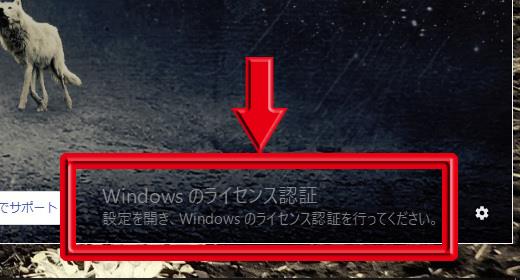
<span style="color: #ff3300;">Windowsのライセンス認証</span><br />
<span style="color: #ff3300;"> 設定を開き、Windowsのライセンス認証を行ってください。</span><br />
<br />
という透かしが表示されている。<br />
<br />
<img src="//win8.no-mania.com/File/1875656b.jpeg" alt="" width="468" /><br />
<br />
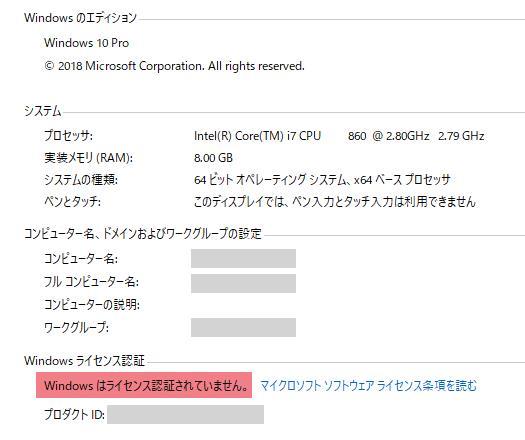
システムのプロパティを開くと確かに<br />
<span style="color: #ff3300;">Windowsはライセンス認証されていません。</span>となっている。<br />
<br />
<img src="//win8.no-mania.com/File/ebe5fb01.jpeg" alt="" width="300" /><br />
<br />
私のwin10 Proは<br />
win7 Proからwin8 Proへ無償アップグレードの後<br />
更にwin10 Proへ無償アップグレードした経緯があるため<br />
その辺に問題があり認証されなくなったのかと焦り<br />
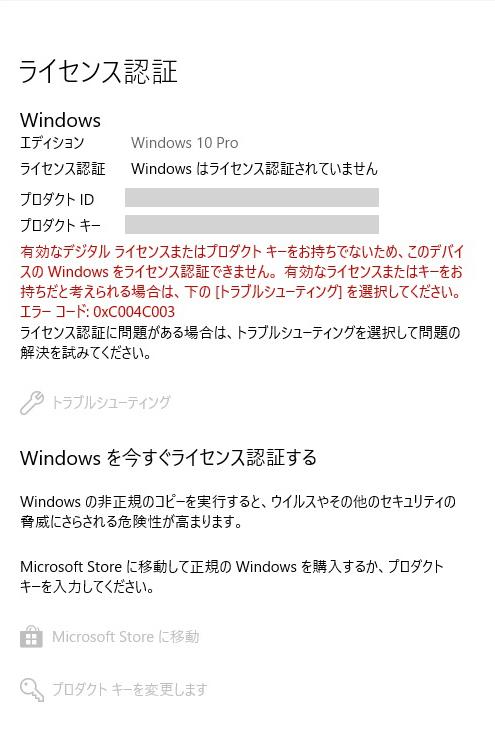
トラブルシューティングしてみると<br />
win10 Homeがなんちゃらと言われライセンス認証されない。<br />
<br />
ググってみるとどうやらwin10 Proのみ<br />
ライセンス認証サーバーでアクティベーションの問題が起きているらしく<br />
数日中に修正されるようなのでしばらく様子を見たい。<br />
<br />
<span style="color: #0000ff;">■追記：2018/11/09</span><br />
　翌日、無事ライセンス認証された。<br />
<br />

<script async="" src="//pagead2.googlesyndication.com/pagead/js/adsbygoogle.js" type="text/javascript"></script>
<!-- 忍者ブログ四角（小） --> <ins class="adsbygoogle" style="display: inline-block; width: 300px; height: 250px;" data-ad-client="ca-pub-9590588813454524" data-ad-slot="3378225444"></ins>
<script type="text/javascript">(adsbygoogle = window.adsbygoogle || []).push({});</script>
<br />
<br />
]]></content:encoded>
    <dc:subject>windows10</dc:subject>
    <dc:date>2018-11-18T23:00:00+09:00</dc:date>
    <dc:creator>No Name Ninja</dc:creator>
    <dc:publisher>NINJA BLOG</dc:publisher>
    <dc:rights>No Name Ninja</dc:rights>
  </item>
  <item rdf:about="https://win8.no-mania.com/ssd/ssd_samsungssd_weight">
    <link>https://win8.no-mania.com/ssd/ssd_samsungssd_weight</link>
    <title>Samsung SSDの重さを量ってみた</title>
    <description>■Fujitsu MJA2160BH（160GB、5,400rpm）


まずは元々付いていたHDDの重さ。


■Samsung SSD 850 EVO（120GB）


そしてSSDの重さ。
HDDの半分以下で持った感覚もめちゃくちゃ軽い。

以上、重量マニアのために。


rakuten_de...</description>
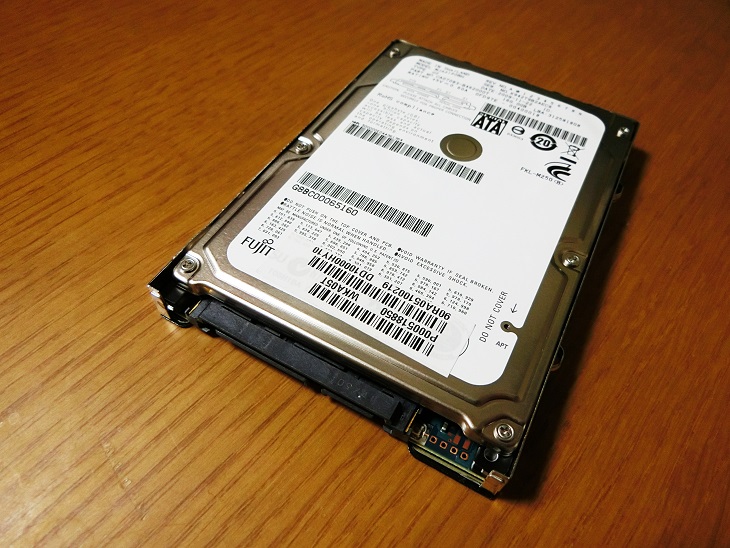
    <content:encoded><![CDATA[<span style="color: #ff3333; font-size: 20px;">■Fujitsu MJA2160BH（160GB、5,400rpm）</span><br />
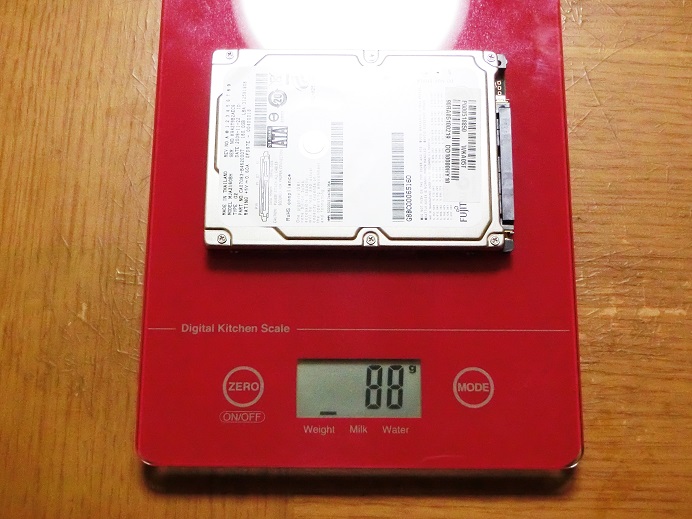
<img width="468" src="//win8.no-mania.com/File/8e07248d.jpeg" alt="" /><br />
<br />
まずは元々付いていたHDDの重さ。<br />
<br />
<br />
<span style="color: #ff3333; font-size: 20px;">■Samsung SSD 850 EVO（120GB）</span><br />
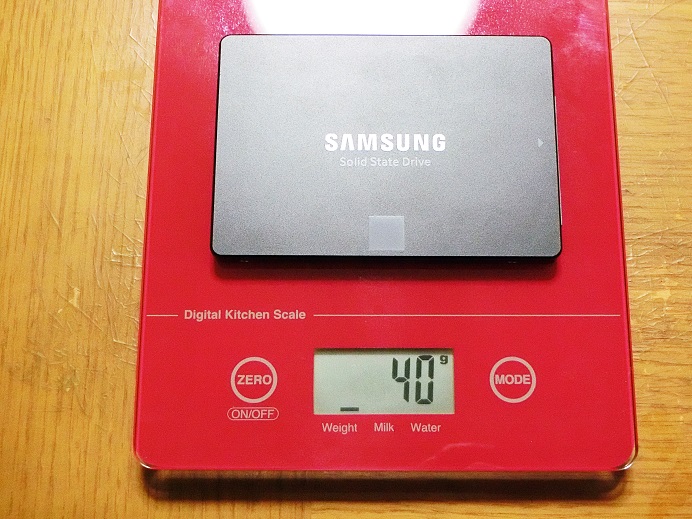
<img width="468" src="//win8.no-mania.com/File/3fda7cc4.jpeg" alt="" /><br />
<br />
そしてSSDの重さ。<br />
HDDの半分以下で持った感覚もめちゃくちゃ軽い。<br />
<br />
以上、重量マニアのために。<br />
<br />
<!-- Rakuten Widget FROM HERE -->
<script type="text/javascript">rakuten_design="slide";rakuten_affiliateId="00443c99.09d38f51.058c51e0.9c8f10e0";rakuten_items="ranking";rakuten_genreId=0;rakuten_size="468x160";rakuten_target="_blank";rakuten_theme="gray";rakuten_border="off";rakuten_auto_mode="on";rakuten_genre_title="off";rakuten_recommend="on";</script>
<script type="text/javascript" src="http://xml.affiliate.rakuten.co.jp/widget/js/rakuten_widget.js"></script>
<!-- Rakuten Widget TO HERE --><br />
<br />
■関連記事（サブdynabook）<br />
<a href="http://win8.no-mania.com/ssd/ssd_dynabook1" title="" target="_blank"><span style="text-decoration: underline;">（1）～確認編～</span></a><br />
<a href="http://win8.no-mania.com/ssd/ssd_dynabook2" title="" target="_blank"><span style="text-decoration: underline;">（2）～インストールメディア作成編～</span></a><br />
<a href="http://win8.no-mania.com/ssd/ssd_dynabook3" title="" target="_blank"><span style="text-decoration: underline;">（3）～SSD取り付け編～</span></a><br />
<a href="http://win8.no-mania.com/ssd/ssd_dynabook4" title="" target="_blank"><span style="text-decoration: underline;">（4）～win10クリーンインストール編～</span></a><br />
<a href="http://win8.no-mania.com/ssd/ssd_dynabook5" title="" target="_blank"><span style="text-decoration: underline;">（5）～転送速度確認編～</span></a><br />
<a href="http://win8.no-mania.com/ssd/ssd_dynabook_samsungmagician" title="" target="_blank"><span style="text-decoration: underline;">（番外編1）～ネットブックでSamsung Magicianを使う方法～</span></a><br />
<a href="http://win8.no-mania.com/ssd/ssd_samsungssd_weight" title="" target="_blank"><span style="text-decoration: underline;">（番外編2）～Samsung SSDの重さを量ってみた～</span></a><br />
<br />
■関連記事（メインPC）<br />
<a href="http://win8.no-mania.com/ssd/ssd_1" title="" target="_self"><span style="text-decoration: underline;">（1）～確認編～</span></a><br />
<a href="http://win8.no-mania.com/ssd/ssd_2" title="" target="_self"><span style="text-decoration: underline;">（2）～SSD選び編～</span></a><br />
<a href="http://win8.no-mania.com/ssd/ssd_3" title="" target="_self"><span style="text-decoration: underline;">（3）～SSD取り付け編～</span></a><br />
<a href="http://win8.no-mania.com/ssd/ssd_4" title="" target="_self"><span style="text-decoration: underline;">（4）～クローン作成編～</span></a><br />
<a href="http://win8.no-mania.com/ssd/ssd_5" title="" target="_self"><span style="text-decoration: underline;">（5）～転送速度確認編～</span></a><br />
<a href="http://win8.no-mania.com/ssd/ssd_6" title="" target="_self"><span style="text-decoration: underline;">（6）～急転直下編～</span></a><br />
<a href="http://win8.no-mania.com/ssd/wd10ezex" title="" target="_self"><span style="text-decoration: underline;">（番外編）HDDの転送速度を計ってみた</span></a><br />
<br />

<script async="" src="//pagead2.googlesyndication.com/pagead/js/adsbygoogle.js" type="text/javascript"></script>
<!-- 忍者ブログ四角（小） --> <ins class="adsbygoogle" style="display: inline-block; width: 300px; height: 250px;" data-ad-client="ca-pub-9590588813454524" data-ad-slot="3378225444"></ins>
<script type="text/javascript">(adsbygoogle = window.adsbygoogle || []).push({});</script>]]></content:encoded>
    <dc:subject>SSD換装</dc:subject>
    <dc:date>2016-01-22T01:00:00+09:00</dc:date>
    <dc:creator>No Name Ninja</dc:creator>
    <dc:publisher>NINJA BLOG</dc:publisher>
    <dc:rights>No Name Ninja</dc:rights>
  </item>
  <item rdf:about="https://win8.no-mania.com/ssd/ssd_dynabook_samsungmagician">
    <link>https://win8.no-mania.com/ssd/ssd_dynabook_samsungmagician</link>
    <title>ネットブックでSamsung Magicianを使う方法</title>
    <description>

&amp;amp;uarr;Samsung SSDに付属しているソフトの「Samsung Magician」
ネットブックだと解像度（1280&amp;amp;times;600）の問題で全体を表示できない。


&amp;amp;uarr;そこでwin8の時と同じく
解像度の問題でアプリが使えなった際の対処方法が使える。


raku...</description>
    <content:encoded><![CDATA[<img width="468" src="//win8.no-mania.com/File/9fe52dbc.jpeg" alt="" /><br />
<br />
&uarr;Samsung SSDに付属しているソフトの「Samsung Magician」<br />
ネットブックだと解像度（1280&times;600）の問題で全体を表示できない。<br />
<br />
<br />
<iframe width="468" height="263" src="https://www.youtube.com/embed/jBaFDIhosOU" frameborder="0" allowfullscreen=""></iframe><br />
<br />
&uarr;そこでwin8の時と同じく<br />
解像度の問題でアプリが使えなった際の対処方法が使える。<br />
<br />
<br />
<!-- Rakuten Widget FROM HERE -->
<script type="text/javascript">rakuten_design="slide";rakuten_affiliateId="00443c99.09d38f51.058c51e0.9c8f10e0";rakuten_items="ranking";rakuten_genreId=0;rakuten_size="468x160";rakuten_target="_blank";rakuten_theme="gray";rakuten_border="off";rakuten_auto_mode="on";rakuten_genre_title="off";rakuten_recommend="on";</script>
<script type="text/javascript" src="http://xml.affiliate.rakuten.co.jp/widget/js/rakuten_widget.js"></script>
<!-- Rakuten Widget TO HERE --><br />
<br />
■関連記事（サブdynabook）<br />
<a href="http://win8.no-mania.com/ssd/ssd_dynabook1" title="" target="_blank"><span style="text-decoration: underline;">（1）～確認編～</span></a><br />
<a href="http://win8.no-mania.com/ssd/ssd_dynabook2" title="" target="_blank"><span style="text-decoration: underline;">（2）～インストールメディア作成編～</span></a><br />
<a href="http://win8.no-mania.com/ssd/ssd_dynabook3" title="" target="_blank"><span style="text-decoration: underline;">（3）～SSD取り付け編～</span></a><br />
<a href="http://win8.no-mania.com/ssd/ssd_dynabook4" title="" target="_blank"><span style="text-decoration: underline;">（4）～win10クリーンインストール編～</span></a><br />
<a href="http://win8.no-mania.com/ssd/ssd_dynabook5" title="" target="_blank"><span style="text-decoration: underline;">（5）～転送速度確認編～</span></a><br />
<a href="http://win8.no-mania.com/ssd/ssd_dynabook_samsungmagician" title="" target="_blank"><span style="text-decoration: underline;">（番外編1）～ネットブックでSamsung Magicianを使う方法～</span></a><br />
<a href="http://win8.no-mania.com/ssd/ssd_samsungssd_weight" title="" target="_blank"><span style="text-decoration: underline;">（番外編2）～Samsung SSDの重さを量ってみた～</span></a><br />
<br />
■関連記事（メインPC）<br />
<a href="http://win8.no-mania.com/ssd/ssd_1" title="" target="_self"><span style="text-decoration: underline;">（1）～確認編～</span></a><br />
<a href="http://win8.no-mania.com/ssd/ssd_2" title="" target="_self"><span style="text-decoration: underline;">（2）～SSD選び編～</span></a><br />
<a href="http://win8.no-mania.com/ssd/ssd_3" title="" target="_self"><span style="text-decoration: underline;">（3）～SSD取り付け編～</span></a><br />
<a href="http://win8.no-mania.com/ssd/ssd_4" title="" target="_self"><span style="text-decoration: underline;">（4）～クローン作成編～</span></a><br />
<a href="http://win8.no-mania.com/ssd/ssd_5" title="" target="_self"><span style="text-decoration: underline;">（5）～転送速度確認編～</span></a><br />
<a href="http://win8.no-mania.com/ssd/ssd_6" title="" target="_self"><span style="text-decoration: underline;">（6）～急転直下編～</span></a><br />
<a href="http://win8.no-mania.com/ssd/wd10ezex" title="" target="_self"><span style="text-decoration: underline;">（番外編）HDDの転送速度を計ってみた</span></a><br />
<br />

<script async="" src="//pagead2.googlesyndication.com/pagead/js/adsbygoogle.js" type="text/javascript"></script>
<!-- 忍者ブログ四角（小） --> <ins class="adsbygoogle" style="display: inline-block; width: 300px; height: 250px;" data-ad-client="ca-pub-9590588813454524" data-ad-slot="3378225444"></ins>
<script type="text/javascript">(adsbygoogle = window.adsbygoogle || []).push({});</script>]]></content:encoded>
    <dc:subject>SSD換装</dc:subject>
    <dc:date>2016-01-21T01:00:00+09:00</dc:date>
    <dc:creator>No Name Ninja</dc:creator>
    <dc:publisher>NINJA BLOG</dc:publisher>
    <dc:rights>No Name Ninja</dc:rights>
  </item>
  <item rdf:about="https://win8.no-mania.com/ssd/ssd_dynabook5">
    <link>https://win8.no-mania.com/ssd/ssd_dynabook5</link>
    <title>dynabookをSSDに換装してみた（5）～転送速度確認編～</title>
    <description>■Fujitsu MJA2160BH（160GB、5,400rpm）


まずは元々付いていたHDDの転送速度。
予想通りの低速っぷり。


■Samsung SSD 850 EVO（120GB）


そしてSSD換装後の転送速度。
HDDより約2.5倍くらいになった。

恐らくdynabook U...</description>
    <content:encoded><![CDATA[<span style="color: #ff3333; font-size: 20px;">■Fujitsu MJA2160BH（160GB、5,400rpm）</span><br />
<img src="//win8.no-mania.com/File/3cec2c1a.png" alt="" /><br />
<br />
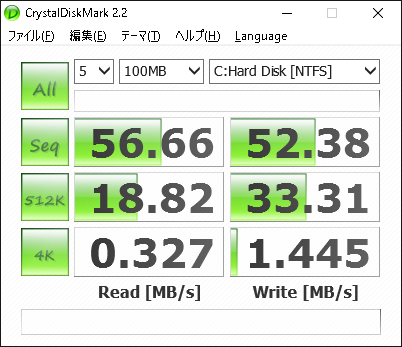
まずは元々付いていたHDDの転送速度。<br />
予想通りの低速っぷり。<br />
<br />
<br />
<span style="color: #ff3333; font-size: 20px;">■Samsung SSD 850 EVO（120GB）</span><br />
<img src="//win8.no-mania.com/File/5f720e69.png" alt="" /><br />
<br />
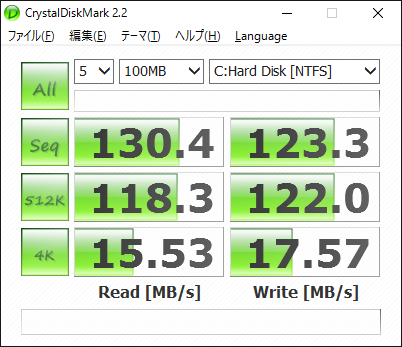
そしてSSD換装後の転送速度。<br />
HDDより約2.5倍くらいになった。<br />
<br />
恐らくdynabook UX23はSATA1接続で<br />
SATA1の実測上限150MB/sに近い値が出ている。<br />
<br />
確かにSSDとしては宝の持ち腐れに違いないが<br />
起動、ソフトが動くまでの時間もだいぶましになったし<br />
サブ機という点も含め満足行く結果となった。<br />
<br />
またPCを買い替える際にも<br />
SSDはそのまま流用できるのでプラスしかない。<br />
<br />
<a rel="nofollow" href="http://www.amazon.co.jp/gp/product/B00QIH3IN0/ref=as_li_qf_sp_asin_il?ie=UTF8&amp;camp=247&amp;creative=1211&amp;creativeASIN=B00QIH3IN0&amp;linkCode=as2&amp;tag=diyratio-22"><img border="0" src="http://ws-fe.amazon-adsystem.com/widgets/q?_encoding=UTF8&amp;ASIN=B00QIH3IN0&amp;Format=_SL250_&amp;ID=AsinImage&amp;MarketPlace=JP&amp;ServiceVersion=20070822&amp;WS=1&amp;tag=diyratio-22" /><br />
<span style="text-decoration: underline;">Samsung SSD 850 EVO（120GB）</span></a><img src="http://ir-jp.amazon-adsystem.com/e/ir?t=diyratio-22&amp;l=as2&amp;o=9&amp;a=B00QIH3IN0" width="1" height="1" border="0" alt="" style="border: none !important; margin: 0px !important;" /><br />
<br />
■関連記事（サブdynabook）<br />
<a href="http://win8.no-mania.com/ssd/ssd_dynabook1" title="" target="_blank"><span style="text-decoration: underline;">（1）～確認編～</span></a><br />
<a href="http://win8.no-mania.com/ssd/ssd_dynabook2" title="" target="_blank"><span style="text-decoration: underline;">（2）～インストールメディア作成編～</span></a><br />
<a href="http://win8.no-mania.com/ssd/ssd_dynabook3" title="" target="_blank"><span style="text-decoration: underline;">（3）～SSD取り付け編～</span></a><br />
<a href="http://win8.no-mania.com/ssd/ssd_dynabook4" title="" target="_blank"><span style="text-decoration: underline;">（4）～win10クリーンインストール編～</span></a><br />
<a href="http://win8.no-mania.com/ssd/ssd_dynabook5" title="" target="_blank"><span style="text-decoration: underline;">（5）～転送速度確認編～</span></a><br />
<a href="http://win8.no-mania.com/ssd/ssd_dynabook_samsungmagician" title="" target="_blank"><span style="text-decoration: underline;">（番外編1）～ネットブックでSamsung Magicianを使う方法～</span></a><br />
<a href="http://win8.no-mania.com/ssd/ssd_samsungssd_weight" title="" target="_blank"><span style="text-decoration: underline;">（番外編2）～Samsung SSDの重さを量ってみた～</span></a><br />
<br />
■関連記事（メインPC）<br />
<a href="http://win8.no-mania.com/ssd/ssd_1" title="" target="_self"><span style="text-decoration: underline;">（1）～確認編～</span></a><br />
<a href="http://win8.no-mania.com/ssd/ssd_2" title="" target="_self"><span style="text-decoration: underline;">（2）～SSD選び編～</span></a><br />
<a href="http://win8.no-mania.com/ssd/ssd_3" title="" target="_self"><span style="text-decoration: underline;">（3）～SSD取り付け編～</span></a><br />
<a href="http://win8.no-mania.com/ssd/ssd_4" title="" target="_self"><span style="text-decoration: underline;">（4）～クローン作成編～</span></a><br />
<a href="http://win8.no-mania.com/ssd/ssd_5" title="" target="_self"><span style="text-decoration: underline;">（5）～転送速度確認編～</span></a><br />
<a href="http://win8.no-mania.com/ssd/ssd_6" title="" target="_self"><span style="text-decoration: underline;">（6）～急転直下編～</span></a><br />
<a href="http://win8.no-mania.com/ssd/wd10ezex" title="" target="_self"><span style="text-decoration: underline;">（番外編）HDDの転送速度を計ってみた</span></a><br />
<br />

<script async="" src="//pagead2.googlesyndication.com/pagead/js/adsbygoogle.js" type="text/javascript"></script>
<!-- 忍者ブログ四角（小） --> <ins class="adsbygoogle" style="display: inline-block; width: 300px; height: 250px;" data-ad-client="ca-pub-9590588813454524" data-ad-slot="3378225444"></ins>
<script type="text/javascript">(adsbygoogle = window.adsbygoogle || []).push({});</script>]]></content:encoded>
    <dc:subject>SSD換装</dc:subject>
    <dc:date>2016-01-20T19:00:00+09:00</dc:date>
    <dc:creator>No Name Ninja</dc:creator>
    <dc:publisher>NINJA BLOG</dc:publisher>
    <dc:rights>No Name Ninja</dc:rights>
  </item>
  <item rdf:about="https://win8.no-mania.com/ssd/ssd_dynabook4">
    <link>https://win8.no-mania.com/ssd/ssd_dynabook4</link>
    <title>dynabookをSSDに換装してみた（4）～win10クリーンインストール編～</title>
    <description>

インストールメディアを作成したUSBを挿して


「F2」ボタンを連打しながら電源をオン。


BIOSが立ち上がるので
起動タブで「USB」が一番上に来るようにする。

※USBが表示されない場合は

　FDD
　HDD/SSD
　LAN

こんな感じでFDDを一番上に設定して再起動す...</description>
    <content:encoded><![CDATA[<img width="468" src="//win8.no-mania.com/File/fd6c80e8.jpeg" alt="" /><br />
<br />
インストールメディアを作成したUSBを挿して<br />
<br />
<br />
<img width="300" src="//win8.no-mania.com/File/be8093fa.jpeg" alt="" /><br />
<br />
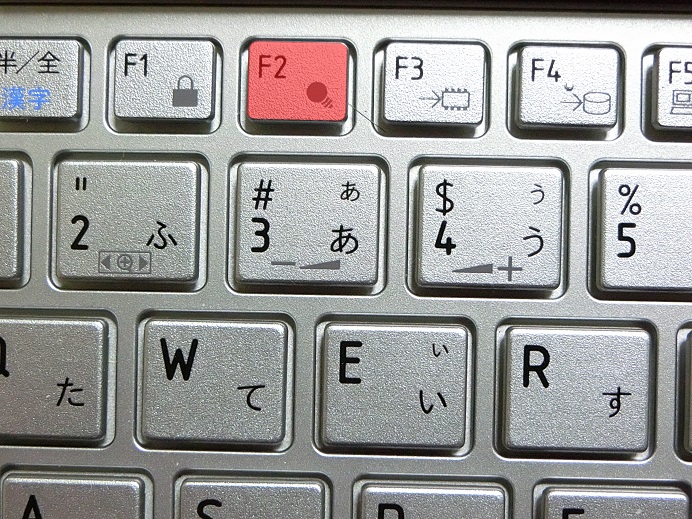
「F2」ボタンを連打しながら電源をオン。<br />
<br />
<br />
<img width="468" src="//win8.no-mania.com/File/1c68b8b1.jpeg" alt="" /><br />
<br />
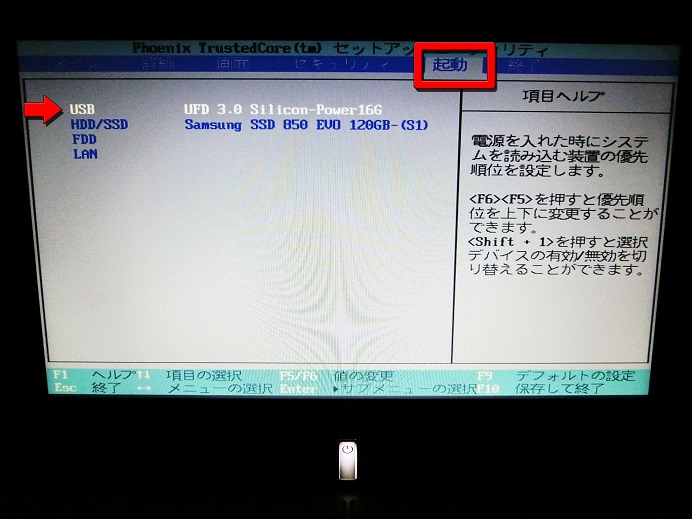
BIOSが立ち上がるので<br />
起動タブで「USB」が一番上に来るようにする。<br />
<br />
<span style="color: #3333ff;">※USBが表示されない場合は<br />
<br />
　FDD<br />
　HDD/SSD<br />
　LAN<br />
<br />
こんな感じでFDDを一番上に設定して再起動すると<br />
USBが表示される場合がある。</span><br />
<br />
<br />
<img width="468" src="//win8.no-mania.com/File/91934b1a.jpeg" alt="" /><br />
<br />
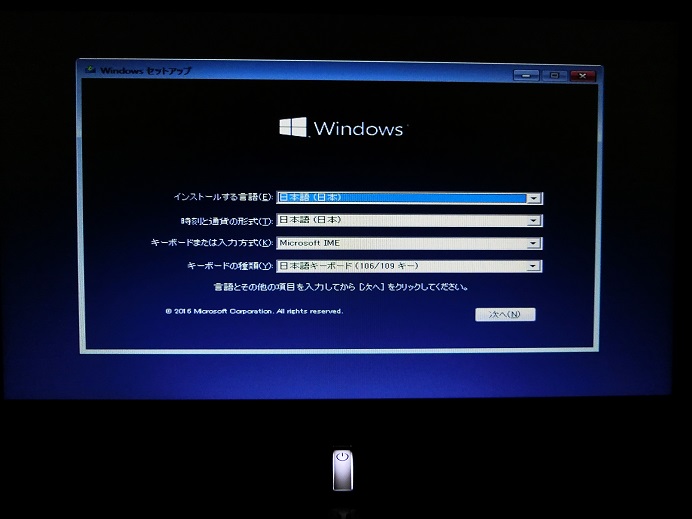
USB起動が成功するとwin10のインストール開始。<br />
<br />
<br />
<img width="468" src="//win8.no-mania.com/File/4c44ebf6.jpeg" alt="" /><br />
<br />
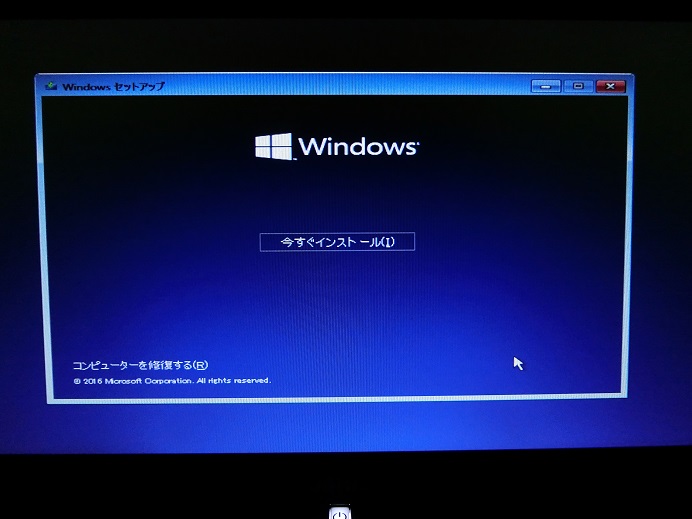
今すぐインストール。<br />
<br />
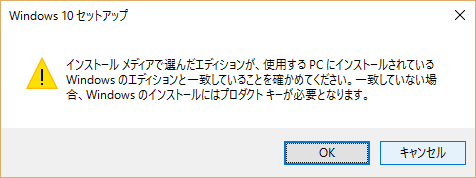
<br />
<img width="468" src="//win8.no-mania.com/File/1ae2a068.jpeg" alt="" /><br />
<br />
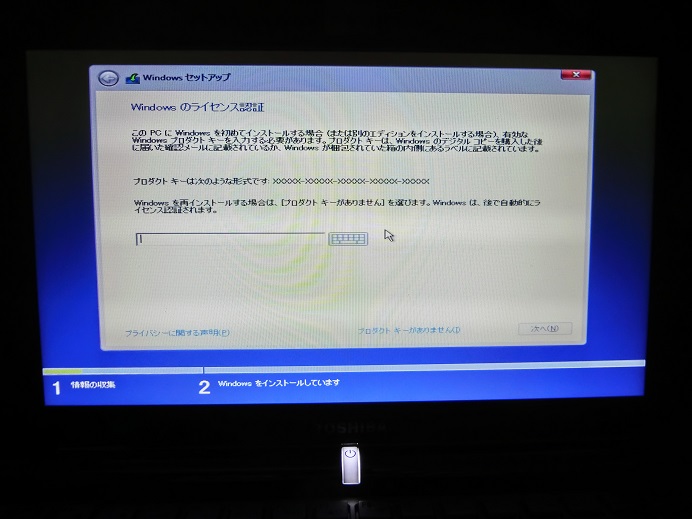
プロダクトキーを求められるので入力する。<br />
<br />
※プロダクトキーの有無は事前に確認しておく。<br />
　手元に無い場合は下記フリーソフトで調べることも可能（自己責任で）<br />
　・<a href="http://www.rjlsoftware.com/software/utility/winproductkey/download.shtml" title="" target="_blank"><span style="text-decoration: underline;">Windows Product Key Viewer</span></a><br />
<br />
<br />
<img width="468" src="//win8.no-mania.com/File/4ae0e6f7.jpeg" alt="" /><br />
<br />
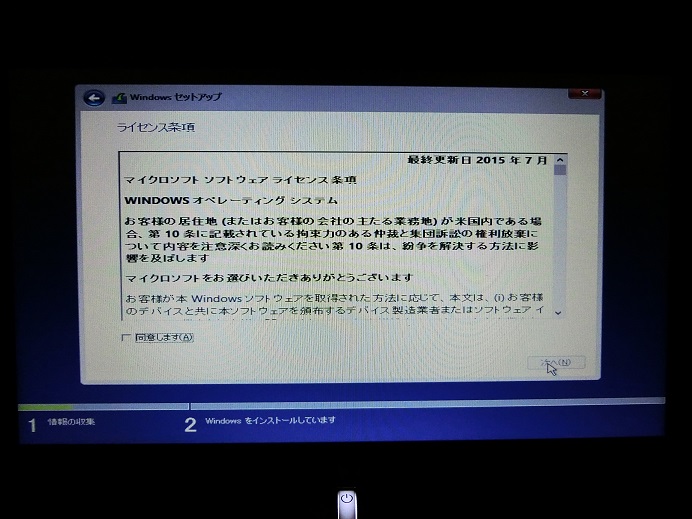
ライセンス条項に同意する。<br />
<br />
<br />
<img width="468" src="//win8.no-mania.com/File/1a859c0a.jpeg" alt="" /><br />
<br />
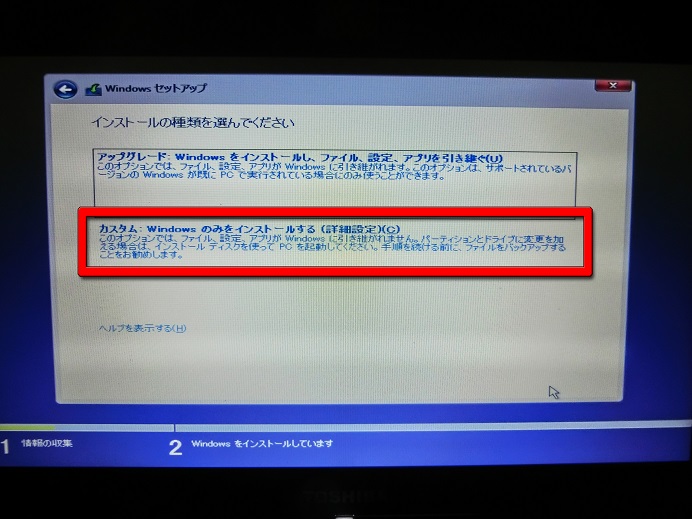
クリーンインストールする場合は<br />
「カスタム：Windowsのみをインストールする」を選ぶ。<br />
<br />
<br />
<img width="468" src="//win8.no-mania.com/File/eb282475.jpeg" alt="" /><br />
<br />
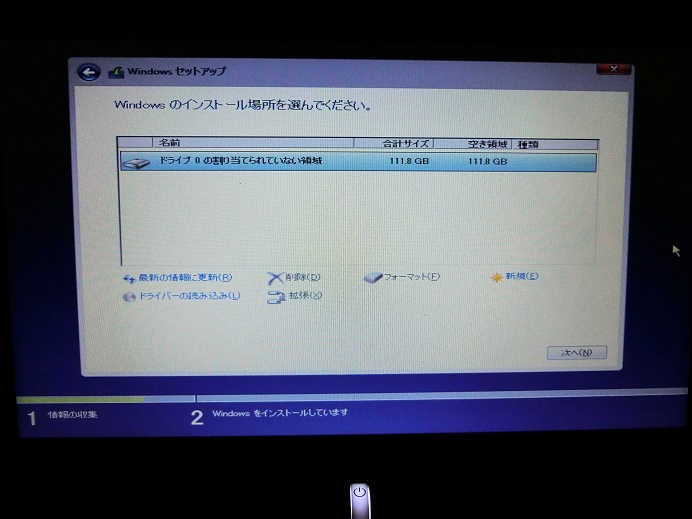
今回は新品のSSDなので何もしなくてもいいが<br />
既にOSがインストールされている場合等では<br />
必要に応じて削除、フォーマットを行う。<br />
<br />
<br />
<img width="468" src="//win8.no-mania.com/File/3bdddee6.jpeg" alt="" /><br />
<br />
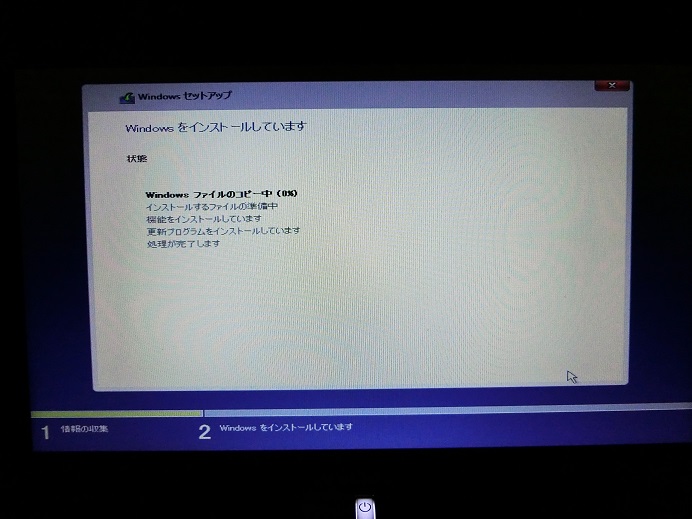
インストール中&hellip;<br />
<br />
後はガイドに従いながら進めるだけなので<br />
特に難しいことは無いだろう（分からない場合はスキップしてもいい）<br />
<br />
<br />
<!-- Rakuten Widget FROM HERE -->
<script type="text/javascript">rakuten_design="slide";rakuten_affiliateId="00443c99.09d38f51.058c51e0.9c8f10e0";rakuten_items="ranking";rakuten_genreId=0;rakuten_size="468x160";rakuten_target="_blank";rakuten_theme="gray";rakuten_border="off";rakuten_auto_mode="on";rakuten_genre_title="off";rakuten_recommend="on";</script>
<script type="text/javascript" src="http://xml.affiliate.rakuten.co.jp/widget/js/rakuten_widget.js"></script>
<!-- Rakuten Widget TO HERE --><br />
<br />
■関連記事（サブdynabook）<br />
<a href="http://win8.no-mania.com/ssd/ssd_dynabook1" title="" target="_blank"><span style="text-decoration: underline;">（1）～確認編～</span></a><br />
<a href="http://win8.no-mania.com/ssd/ssd_dynabook2" title="" target="_blank"><span style="text-decoration: underline;">（2）～インストールメディア作成編～</span></a><br />
<a href="http://win8.no-mania.com/ssd/ssd_dynabook3" title="" target="_blank"><span style="text-decoration: underline;">（3）～SSD取り付け編～</span></a><br />
<a href="http://win8.no-mania.com/ssd/ssd_dynabook4" title="" target="_blank"><span style="text-decoration: underline;">（4）～win10クリーンインストール編～</span></a><br />
<a href="http://win8.no-mania.com/ssd/ssd_dynabook5" title="" target="_blank"><span style="text-decoration: underline;">（5）～転送速度確認編～</span></a><br />
<a href="http://win8.no-mania.com/ssd/ssd_dynabook_samsungmagician" title="" target="_blank"><span style="text-decoration: underline;">（番外編1）～ネットブックでSamsung Magicianを使う方法～</span></a><br />
<a href="http://win8.no-mania.com/ssd/ssd_samsungssd_weight" title="" target="_blank"><span style="text-decoration: underline;">（番外編2）～Samsung SSDの重さを量ってみた～</span></a><br />
<br />
■関連記事（メインPC）<br />
<a href="http://win8.no-mania.com/ssd/ssd_1" title="" target="_self"><span style="text-decoration: underline;">（1）～確認編～</span></a><br />
<a href="http://win8.no-mania.com/ssd/ssd_2" title="" target="_self"><span style="text-decoration: underline;">（2）～SSD選び編～</span></a><br />
<a href="http://win8.no-mania.com/ssd/ssd_3" title="" target="_self"><span style="text-decoration: underline;">（3）～SSD取り付け編～</span></a><br />
<a href="http://win8.no-mania.com/ssd/ssd_4" title="" target="_self"><span style="text-decoration: underline;">（4）～クローン作成編～</span></a><br />
<a href="http://win8.no-mania.com/ssd/ssd_5" title="" target="_self"><span style="text-decoration: underline;">（5）～転送速度確認編～</span></a><br />
<a href="http://win8.no-mania.com/ssd/ssd_6" title="" target="_self"><span style="text-decoration: underline;">（6）～急転直下編～</span></a><br />
<a href="http://win8.no-mania.com/ssd/wd10ezex" title="" target="_self"><span style="text-decoration: underline;">（番外編）HDDの転送速度を計ってみた</span></a><br />
<br />

<script async="" src="//pagead2.googlesyndication.com/pagead/js/adsbygoogle.js" type="text/javascript"></script>
<!-- 忍者ブログ四角（小） --> <ins class="adsbygoogle" style="display: inline-block; width: 300px; height: 250px;" data-ad-client="ca-pub-9590588813454524" data-ad-slot="3378225444"></ins>
<script type="text/javascript">(adsbygoogle = window.adsbygoogle || []).push({});</script>]]></content:encoded>
    <dc:subject>SSD換装</dc:subject>
    <dc:date>2016-01-19T21:00:00+09:00</dc:date>
    <dc:creator>No Name Ninja</dc:creator>
    <dc:publisher>NINJA BLOG</dc:publisher>
    <dc:rights>No Name Ninja</dc:rights>
  </item>
  <item rdf:about="https://win8.no-mania.com/ssd/ssd_dynabook3">
    <link>https://win8.no-mania.com/ssd/ssd_dynabook3</link>
    <title>dynabookをSSDに換装してみた（3）～SSD取り付け編～</title>
    <description>

今回選んだのは
Samsung SSD 850 EVO（120GB）。
750と迷ったがTLCぽかったのと
価格差（500円くらい）があまりなかったため。

あとSamsung SSDの
キャンペーンに応募したかったのも理由の一つ。

■Samsung SSD めちゃ速キャンペーン（1/25まで...</description>
    <content:encoded><![CDATA[<img width="468" src="//win8.no-mania.com/File/CIMG0413.JPG" alt="" /><br />
<br />
今回選んだのは<br />
<a rel="nofollow" href="http://www.amazon.co.jp/gp/product/B00QIH3IN0/ref=as_li_qf_sp_asin_tl?ie=UTF8&amp;camp=247&amp;creative=1211&amp;creativeASIN=B00QIH3IN0&amp;linkCode=as2&amp;tag=diyratio-22"><span style="text-decoration: underline;">Samsung SSD 850 EVO（120GB）</span></a><img src="http://ir-jp.amazon-adsystem.com/e/ir?t=diyratio-22&amp;l=as2&amp;o=9&amp;a=B00QIH3IN0" width="1" height="1" border="0" alt="" style="border: none !important; margin: 0px !important;" />。<br />
<a rel="nofollow" href="http://www.amazon.co.jp/gp/product/B017SMDNCY/ref=as_li_qf_sp_asin_tl?ie=UTF8&amp;camp=247&amp;creative=1211&amp;creativeASIN=B017SMDNCY&amp;linkCode=as2&amp;tag=diyratio-22"><span style="text-decoration: underline;">750</span></a><img src="http://ir-jp.amazon-adsystem.com/e/ir?t=diyratio-22&amp;l=as2&amp;o=9&amp;a=B017SMDNCY" width="1" height="1" border="0" alt="" style="border: none !important; margin: 0px !important;" />と迷ったがTLCぽかったのと<br />
価格差（500円くらい）があまりなかったため。<br />
<br />
あとSamsung SSDの<br />
キャンペーンに応募したかったのも理由の一つ。<br />
<br />
■Samsung SSD めちゃ速キャンペーン（1/25まで）<br />
<a href="http://www.itgm.co.jp/2015wintercp/" title="" target="_blank"><span style="text-decoration: underline;">http://www.itgm.co.jp/2015wintercp/</span></a><br />
<br />
容量を120GBにしたのは<br />
dynabookはサブ機でほとんど使わず<br />
ソフトもデータも入れないため。<br />
<span style="color: #777777;">（※主にメインPCが壊れた際に活躍する）</span><br />
<br />
<br />
<img width="468" src="//win8.no-mania.com/File/CIMG0414.JPG" alt="" /><br />
<br />
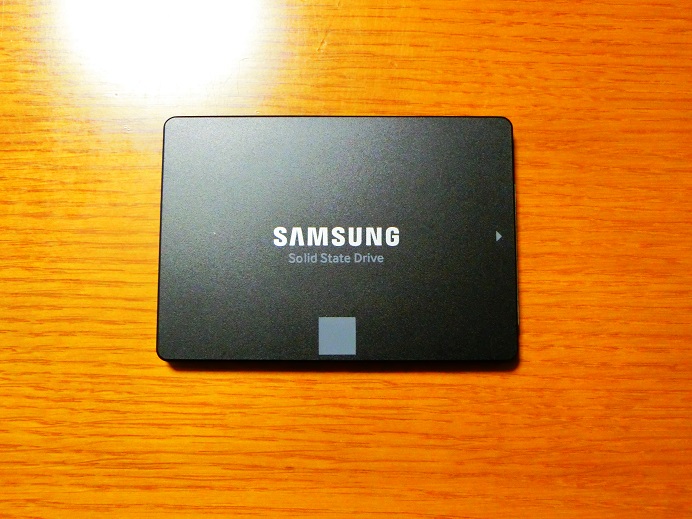
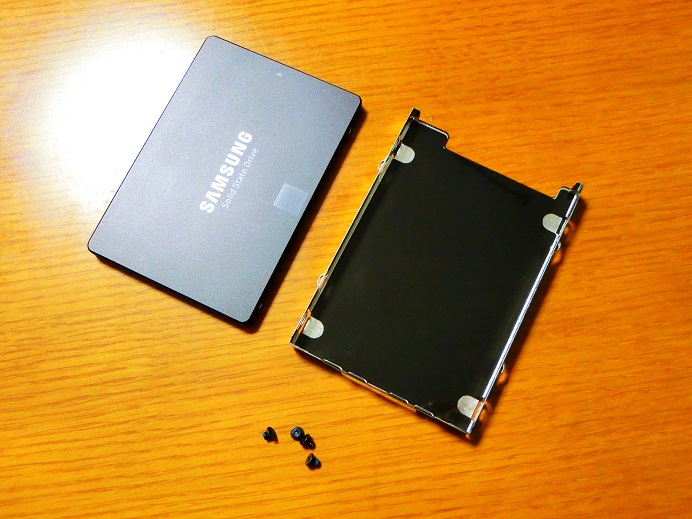
SSD本体。<br />
めちゃめちゃ軽い（重量は後日追記）<br />
<br />
<br />
<img width="468" src="//win8.no-mania.com/File/CIMG0415.JPG" alt="" /><br />
<br />
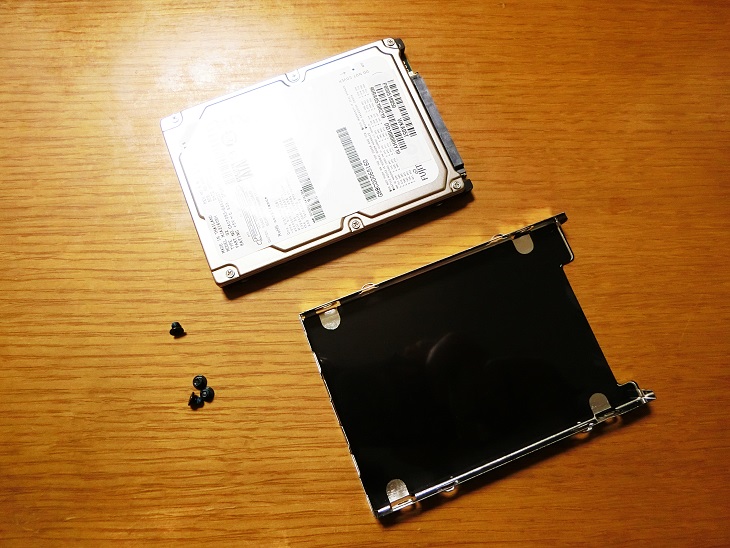
HDDが収まってたケースを<br />
<br />
<br />
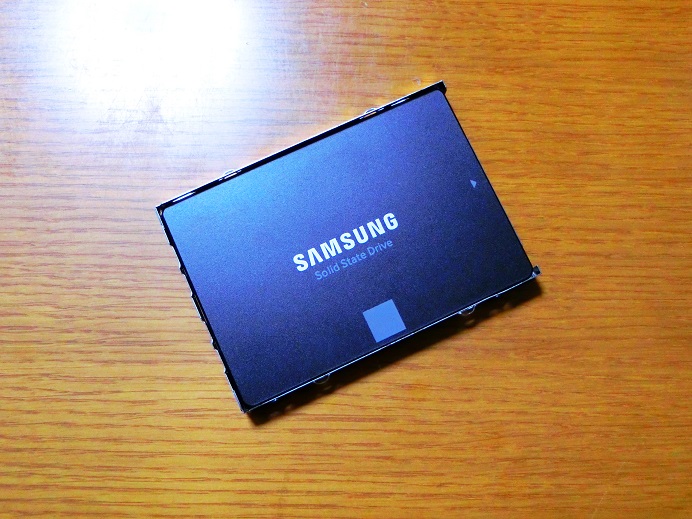
<img width="468" src="//win8.no-mania.com/File/CIMG0416.JPG" alt="" /><br />
<br />
取り付けて<br />
<br />
<br />
<img width="468" src="//win8.no-mania.com/File/CIMG0417.JPG" alt="" /><br />
<br />
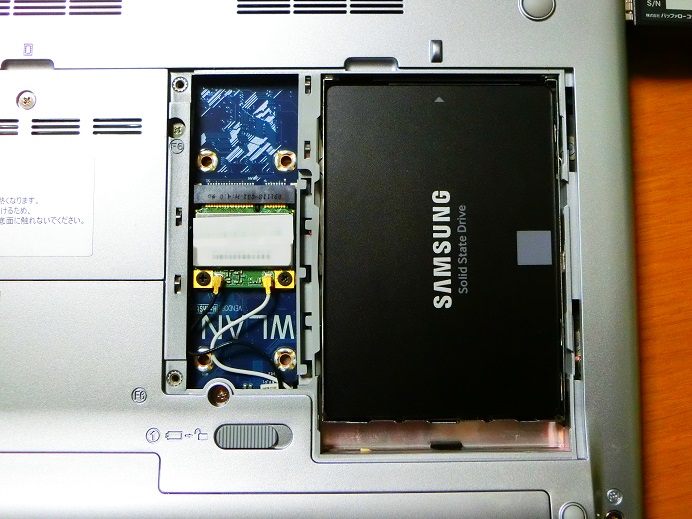
PC本体に挿し込み<br />
蓋を閉めたら準備完了！<br />
<br />
<br />
<a rel="nofollow" href="http://www.amazon.co.jp/gp/product/B00QIH3IN0/ref=as_li_qf_sp_asin_il?ie=UTF8&amp;camp=247&amp;creative=1211&amp;creativeASIN=B00QIH3IN0&amp;linkCode=as2&amp;tag=diyratio-22"><img border="0" src="http://ws-fe.amazon-adsystem.com/widgets/q?_encoding=UTF8&amp;ASIN=B00QIH3IN0&amp;Format=_SL250_&amp;ID=AsinImage&amp;MarketPlace=JP&amp;ServiceVersion=20070822&amp;WS=1&amp;tag=diyratio-22" /><br />
<span style="text-decoration: underline;">Samsung SSD 850 EVO（120GB）</span></a><img src="http://ir-jp.amazon-adsystem.com/e/ir?t=diyratio-22&amp;l=as2&amp;o=9&amp;a=B00QIH3IN0" width="1" height="1" border="0" alt="" style="border: none !important; margin: 0px !important;" /><br />
<br />
■関連記事（サブdynabook）<br />
<a href="http://win8.no-mania.com/ssd/ssd_dynabook1" title="" target="_blank"><span style="text-decoration: underline;">（1）～確認編～</span></a><br />
<a href="http://win8.no-mania.com/ssd/ssd_dynabook2" title="" target="_blank"><span style="text-decoration: underline;">（2）～インストールメディア作成編～</span></a><br />
<a href="http://win8.no-mania.com/ssd/ssd_dynabook3" title="" target="_blank"><span style="text-decoration: underline;">（3）～SSD取り付け編～</span></a><br />
<a href="http://win8.no-mania.com/ssd/ssd_dynabook4" title="" target="_blank"><span style="text-decoration: underline;">（4）～win10クリーンインストール編～</span></a><br />
<a href="http://win8.no-mania.com/ssd/ssd_dynabook5" title="" target="_blank"><span style="text-decoration: underline;">（5）～転送速度確認編～</span></a><br />
<a href="http://win8.no-mania.com/ssd/ssd_dynabook_samsungmagician" title="" target="_blank"><span style="text-decoration: underline;">（番外編1）～ネットブックでSamsung Magicianを使う方法～</span></a><br />
<a href="http://win8.no-mania.com/ssd/ssd_samsungssd_weight" title="" target="_blank"><span style="text-decoration: underline;">（番外編2）～Samsung SSDの重さを量ってみた～</span></a><br />
<br />
■関連記事（メインPC）<br />
<a href="http://win8.no-mania.com/ssd/ssd_1" title="" target="_self"><span style="text-decoration: underline;">（1）～確認編～</span></a><br />
<a href="http://win8.no-mania.com/ssd/ssd_2" title="" target="_self"><span style="text-decoration: underline;">（2）～SSD選び編～</span></a><br />
<a href="http://win8.no-mania.com/ssd/ssd_3" title="" target="_self"><span style="text-decoration: underline;">（3）～SSD取り付け編～</span></a><br />
<a href="http://win8.no-mania.com/ssd/ssd_4" title="" target="_self"><span style="text-decoration: underline;">（4）～クローン作成編～</span></a><br />
<a href="http://win8.no-mania.com/ssd/ssd_5" title="" target="_self"><span style="text-decoration: underline;">（5）～転送速度確認編～</span></a><br />
<a href="http://win8.no-mania.com/ssd/ssd_6" title="" target="_self"><span style="text-decoration: underline;">（6）～急転直下編～</span></a><br />
<a href="http://win8.no-mania.com/ssd/wd10ezex" title="" target="_self"><span style="text-decoration: underline;">（番外編）HDDの転送速度を計ってみた</span></a><br />
<br />

<script async="" src="//pagead2.googlesyndication.com/pagead/js/adsbygoogle.js" type="text/javascript"></script>
<!-- 忍者ブログ四角（小） --> <ins class="adsbygoogle" style="display: inline-block; width: 300px; height: 250px;" data-ad-client="ca-pub-9590588813454524" data-ad-slot="3378225444"></ins>
<script type="text/javascript">(adsbygoogle = window.adsbygoogle || []).push({});</script>]]></content:encoded>
    <dc:subject>SSD換装</dc:subject>
    <dc:date>2016-01-18T19:26:47+09:00</dc:date>
    <dc:creator>No Name Ninja</dc:creator>
    <dc:publisher>NINJA BLOG</dc:publisher>
    <dc:rights>No Name Ninja</dc:rights>
  </item>
  <item rdf:about="https://win8.no-mania.com/ssd/ssd_dynabook2">
    <link>https://win8.no-mania.com/ssd/ssd_dynabook2</link>
    <title>dynabookをSSDに換装してみた（2）～インストールメディア作成編～</title>
    <description>

dynabookにはDVDドライブが無いので
ISO（DVDイメージ）ではなく
USBにインストールメディアを作成する。
（※外付けBlu-rayを持っているがUSBを試してみたかった）


■メディア作成ツール
https://www.microsoft.com/ja-jp/softwar...</description>
    <content:encoded><![CDATA[<img width="468" src="//win8.no-mania.com/File/CIMG0399.JPG" alt="" /><br />
<br />
dynabookにはDVDドライブが無いので<br />
ISO（DVDイメージ）ではなく<br />
USBにインストールメディアを作成する。<br />
<span style="color: #777777;">（※外付けBlu-rayを持っているがUSBを試してみたかった）</span><br />
<br />
<br />
<img width="468" src="//win8.no-mania.com/File/00.png" alt="" /><br />
<br />
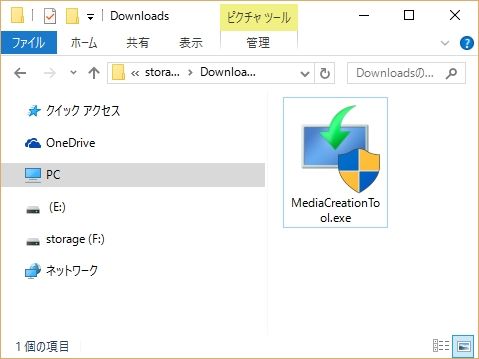
■メディア作成ツール<br />
<a href="https://www.microsoft.com/ja-jp/software-download/windows10" title="" target="_blank"><span style="text-decoration: underline;">https://www.microsoft.com/ja-jp/software-download/windows10</span></a><br />
<br />
&uarr;ページ下部の「ツールを今すぐダウンロード」から<br />
「MediaCreationTool.exe」を落とす。<br />
<br />
<br />
<img width="468" src="//win8.no-mania.com/File/01.png" alt="" /><br />
<br />
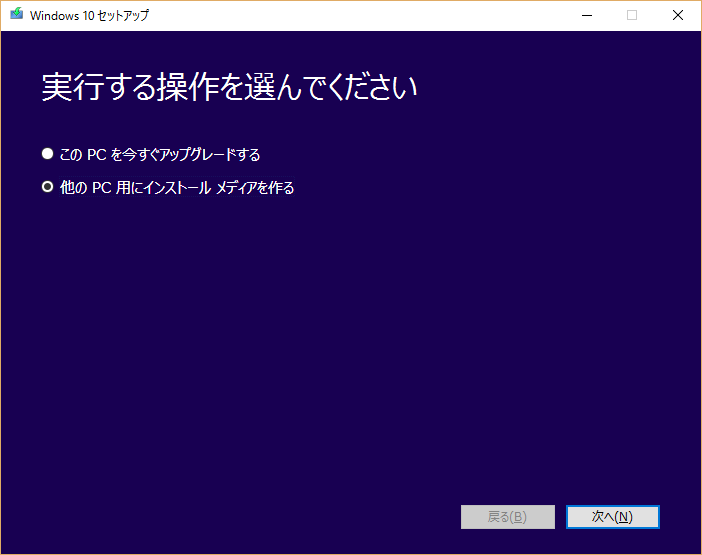
実行するとアップグレードかメディア作成か問われるので<br />
「他のPC用にインストールメディアを作る」を選ぶ。<br />
<br />
<br />
<img width="468" src="//win8.no-mania.com/File/02.png" alt="" /><br />
<br />
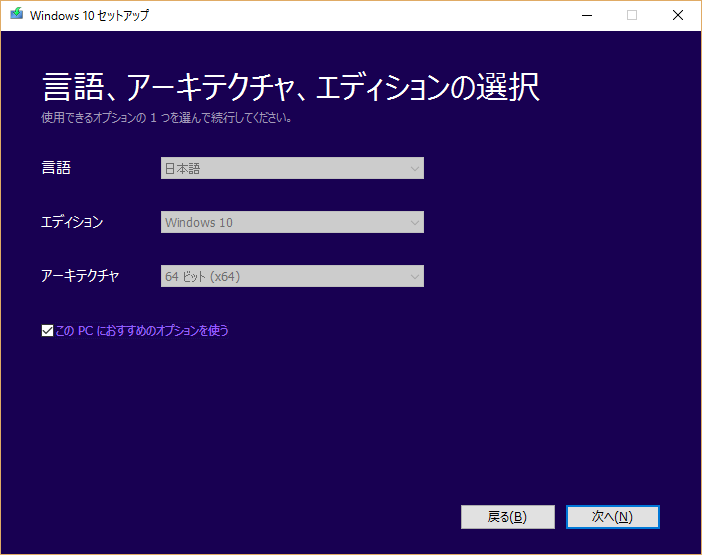
言語、アーキテクチャ、エディションの選択では<br />
今使ってるPCの環境が反映されるので<br />
<br />
<br />
<img width="468" src="//win8.no-mania.com/File/b3ca8cf1.png" alt="" /><br />
<br />
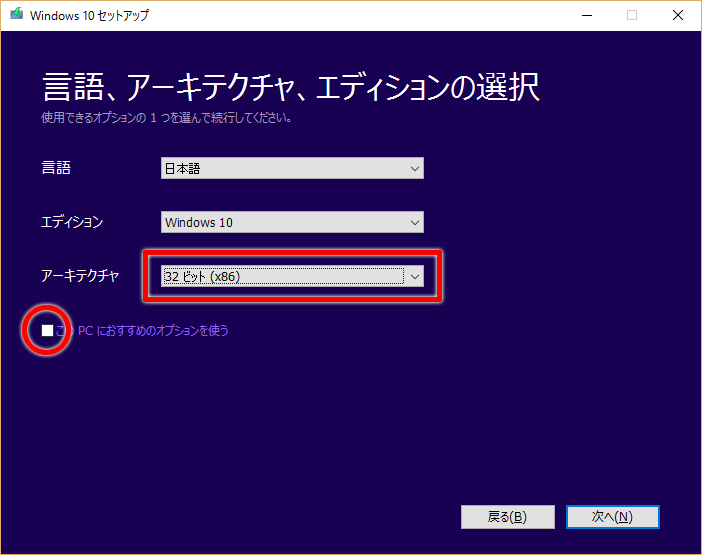
「このPCにおすすめのオプションを使う」のチェックを外し<br />
インストール先のPCの設定に変更する。<br />
<br />
私の場合はインストール先PCが32ビットだったので<br />
アーキテクチャを64ビットから32ビットに変更した。<br />
<br />
<br />
<img width="468" src="//win8.no-mania.com/File/04.png" alt="" /><br />
<br />
プロダクトキーの詳細は後述する。<br />
<br />
<br />
<img width="468" src="//win8.no-mania.com/File/05.png" alt="" /><br />
<br />
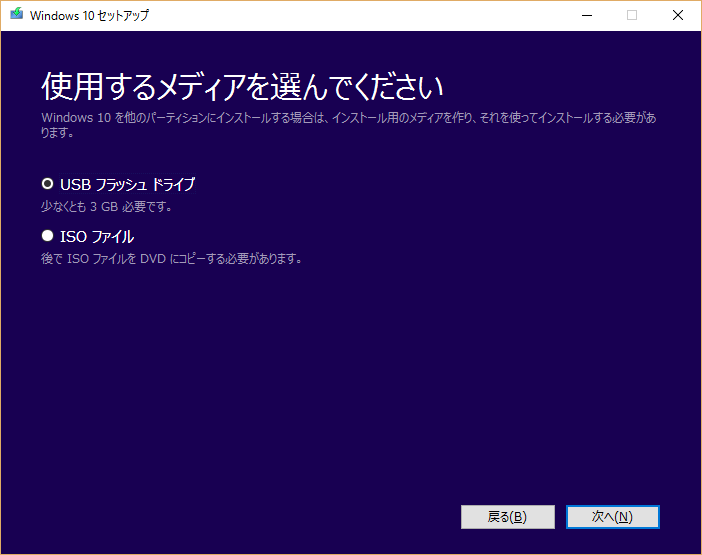
使用するメディアを問われるので<br />
今回は「USB フラッシュ ドライブ」を選ぶ。<br />
<br />
<br />
<img width="468" src="//win8.no-mania.com/File/06.png" alt="" /><br />
<br />
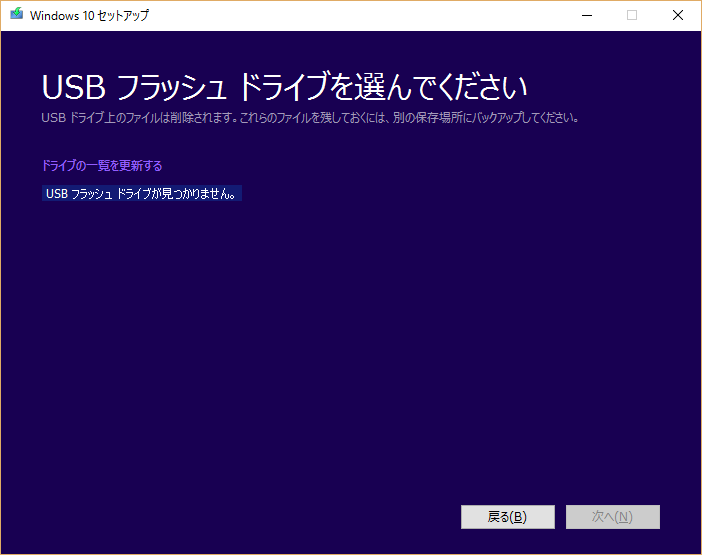
USBを挿してないと<br />
「USBフラッシュドライブが見つかりません」となる。<br />
<br />
<br />
<img width="468" src="//win8.no-mania.com/File/07.png" alt="" /><br />
<br />
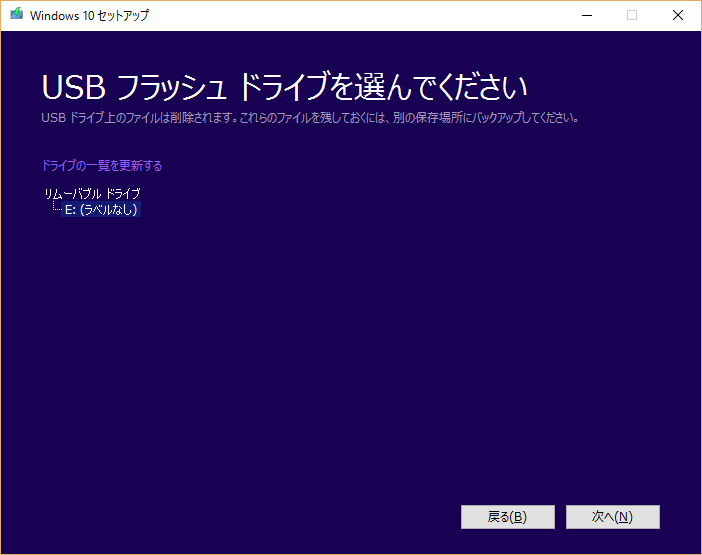
その状態でUSBを挿すと自動認識してくれる。 <br />
<br />
<br />
<img width="468" src="//win8.no-mania.com/File/08.png" alt="" /><br />
<br />
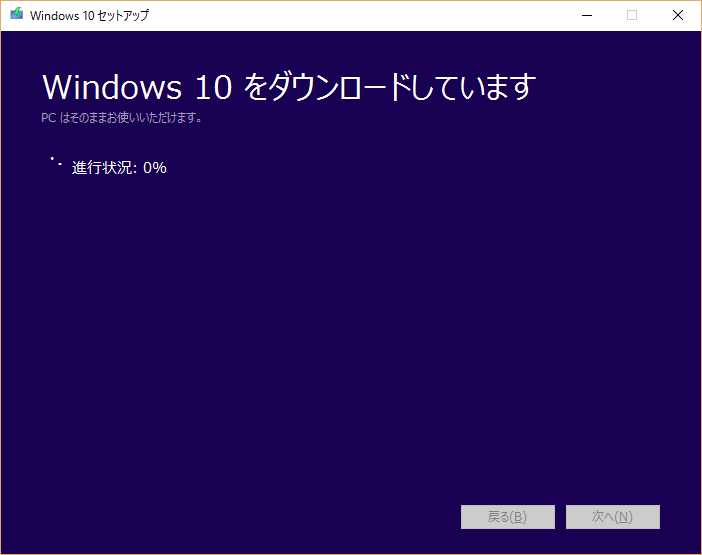
windows10のダウンロードが始まる。<br />
ちなみに容量は3GBくらいなので<br />
余裕を持って8GBのUSBを用意すればいいだろう。<br />
<br />
<br />
<img width="468" src="//win8.no-mania.com/File/CIMG0399.JPG" alt="" /><br />
<br />
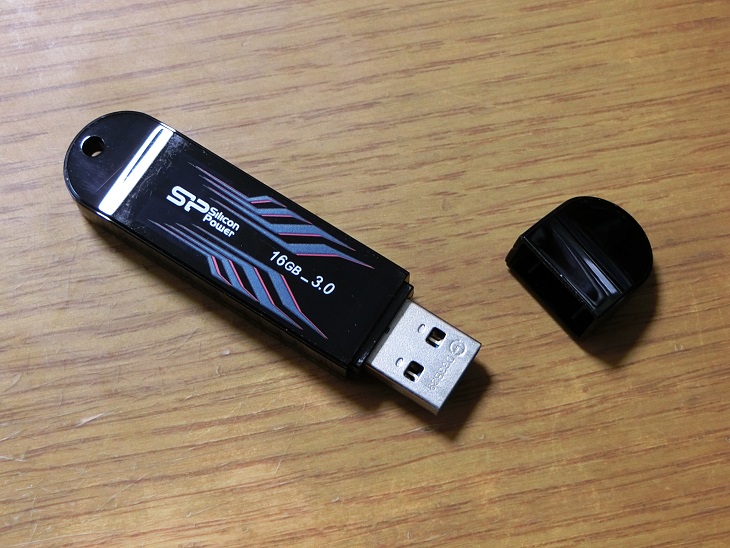
ちなみに私が用意したのは<br />
<a rel="nofollow" href="http://www.amazon.co.jp/gp/product/B004Y8CKHU/ref=as_li_qf_sp_asin_tl?ie=UTF8&amp;camp=247&amp;creative=1211&amp;creativeASIN=B004Y8CKHU&amp;linkCode=as2&amp;tag=diyratio-22"><span style="text-decoration: underline;">シリコンパワーのUSB</span></a><img src="http://ir-jp.amazon-adsystem.com/e/ir?t=diyratio-22&amp;l=as2&amp;o=9&amp;a=B004Y8CKHU" width="1" height="1" border="0" alt="" style="border: none !important; margin: 0px !important;" />でUSB3.0対応、容量16GB。<br />
<br />
<br />
<a rel="nofollow" href="http://www.amazon.co.jp/gp/product/B004Y8CKHU/ref=as_li_qf_sp_asin_il?ie=UTF8&amp;camp=247&amp;creative=1211&amp;creativeASIN=B004Y8CKHU&amp;linkCode=as2&amp;tag=diyratio-22"><img border="0" src="http://ws-fe.amazon-adsystem.com/widgets/q?_encoding=UTF8&amp;ASIN=B004Y8CKHU&amp;Format=_SL250_&amp;ID=AsinImage&amp;MarketPlace=JP&amp;ServiceVersion=20070822&amp;WS=1&amp;tag=diyratio-22" /><br />
<span style="text-decoration: underline;">シリコンパワー USB3.0（16GB）</span></a><img src="http://ir-jp.amazon-adsystem.com/e/ir?t=diyratio-22&amp;l=as2&amp;o=9&amp;a=B004Y8CKHU" width="1" height="1" border="0" alt="" style="border: none !important; margin: 0px !important;" /><br />
<br />
<br />
■関連記事（サブdynabook）<br />
<a href="http://win8.no-mania.com/ssd/ssd_dynabook1" title="" target="_blank"><span style="text-decoration: underline;">（1）～確認編～</span></a><br />
<a href="http://win8.no-mania.com/ssd/ssd_dynabook2" title="" target="_blank"><span style="text-decoration: underline;">（2）～インストールメディア作成編～</span></a><br />
<a href="http://win8.no-mania.com/ssd/ssd_dynabook3" title="" target="_blank"><span style="text-decoration: underline;">（3）～SSD取り付け編～</span></a><br />
<a href="http://win8.no-mania.com/ssd/ssd_dynabook4" title="" target="_blank"><span style="text-decoration: underline;">（4）～win10クリーンインストール編～</span></a><br />
<a href="http://win8.no-mania.com/ssd/ssd_dynabook5" title="" target="_blank"><span style="text-decoration: underline;">（5）～転送速度確認編～</span></a><br />
<a href="http://win8.no-mania.com/ssd/ssd_dynabook_samsungmagician" title="" target="_blank"><span style="text-decoration: underline;">（番外編1）～ネットブックでSamsung Magicianを使う方法～</span></a><br />
<a href="http://win8.no-mania.com/ssd/ssd_samsungssd_weight" title="" target="_blank"><span style="text-decoration: underline;">（番外編2）～Samsung SSDの重さを量ってみた～</span></a><br />
<br />
■関連記事（メインPC）<br />
<a href="http://win8.no-mania.com/ssd/ssd_1" title="" target="_self"><span style="text-decoration: underline;">（1）～確認編～</span></a><br />
<a href="http://win8.no-mania.com/ssd/ssd_2" title="" target="_self"><span style="text-decoration: underline;">（2）～SSD選び編～</span></a><br />
<a href="http://win8.no-mania.com/ssd/ssd_3" title="" target="_self"><span style="text-decoration: underline;">（3）～SSD取り付け編～</span></a><br />
<a href="http://win8.no-mania.com/ssd/ssd_4" title="" target="_self"><span style="text-decoration: underline;">（4）～クローン作成編～</span></a><br />
<a href="http://win8.no-mania.com/ssd/ssd_5" title="" target="_self"><span style="text-decoration: underline;">（5）～転送速度確認編～</span></a><br />
<a href="http://win8.no-mania.com/ssd/ssd_6" title="" target="_self"><span style="text-decoration: underline;">（6）～急転直下編～</span></a><br />
<a href="http://win8.no-mania.com/ssd/wd10ezex" title="" target="_self"><span style="text-decoration: underline;">（番外編）HDDの転送速度を計ってみた</span></a><br />
<br />

<script async="" src="//pagead2.googlesyndication.com/pagead/js/adsbygoogle.js" type="text/javascript"></script>
<!-- 忍者ブログ四角（小） --> <ins class="adsbygoogle" style="display: inline-block; width: 300px; height: 250px;" data-ad-client="ca-pub-9590588813454524" data-ad-slot="3378225444"></ins>
<script type="text/javascript">(adsbygoogle = window.adsbygoogle || []).push({});</script>]]></content:encoded>
    <dc:subject>SSD換装</dc:subject>
    <dc:date>2016-01-13T10:12:38+09:00</dc:date>
    <dc:creator>No Name Ninja</dc:creator>
    <dc:publisher>NINJA BLOG</dc:publisher>
    <dc:rights>No Name Ninja</dc:rights>
  </item>
  <item rdf:about="https://win8.no-mania.com/ssd/ssd_dynabook1">
    <link>https://win8.no-mania.com/ssd/ssd_dynabook1</link>
    <title>dynabookをSSDに換装してみた（1）～確認編～</title>
    <description>

2010年に購入したdynabook（winXP）の延命処置に

　・win8導入（winXP&amp;amp;rarr;win8アップグレード版）
　・メモリ増設（1GB&amp;amp;rarr;2GB）
　・win10アップグレード

を行ったが
動作が遅く使ってていらいらする。

CPUの性能もあるだろうが
メイン機を...</description>
    <content:encoded><![CDATA[<img width="468" src="//win8.no-mania.com/File/88f60221.jpeg" alt="" /><br />
<br />
2010年に購入したdynabook（winXP）の延命処置に<br />
<br />
　・<a href="http://win8.no-mania.com/%E3%82%A4%E3%83%B3%E3%82%B9%E3%83%88%E3%83%BC%E3%83%AB/64%E3%83%93%E3%83%83%E3%83%88%E7%89%88%E3%81%AF%E3%82%A4%E3%83%B3%E3%82%B9%E3%83%88%E3%83%BC%E3%83%AB%E5%87%BA%E6%9D%A5%E3%81%AA%E3%81%84%E3%81%BF%E3%81%9F%E3%81%84" title="" target="_blank"><span style="text-decoration: underline;">win8導入</span></a>（winXP&rarr;win8アップグレード版）<br />
　・<a href="http://win8.no-mania.com/%E3%83%A1%E3%83%A2%E3%83%AA%E4%BA%A4%E6%8F%9B/dynabook%E3%81%AE%E3%83%A1%E3%83%A2%E3%83%AA%E4%BA%A4%E6%8F%9B" title="" target="_blank"><span style="text-decoration: underline;">メモリ増設</span></a>（1GB&rarr;2GB）<br />
　・<a href="http://win8.no-mania.com/windows10/win10netbookupgrade" title="" target="_blank"><span style="text-decoration: underline;">win10アップグレード</span></a><br />
<br />
を行ったが<br />
動作が遅く使ってていらいらする。<br />
<br />
CPUの性能もあるだろうが<br />
<a href="http://win8.no-mania.com/ssd/ssd_1" title="" target="_blank"><span style="text-decoration: underline;">メイン機をSSDに換装</span></a>して速さを実感したので<br />
dynabookもSSDに換装しようと決めた。<br />
<br />
<br />
<img width="468" src="//win8.no-mania.com/File/c95719d1.jpeg" alt="" /><br />
<br />
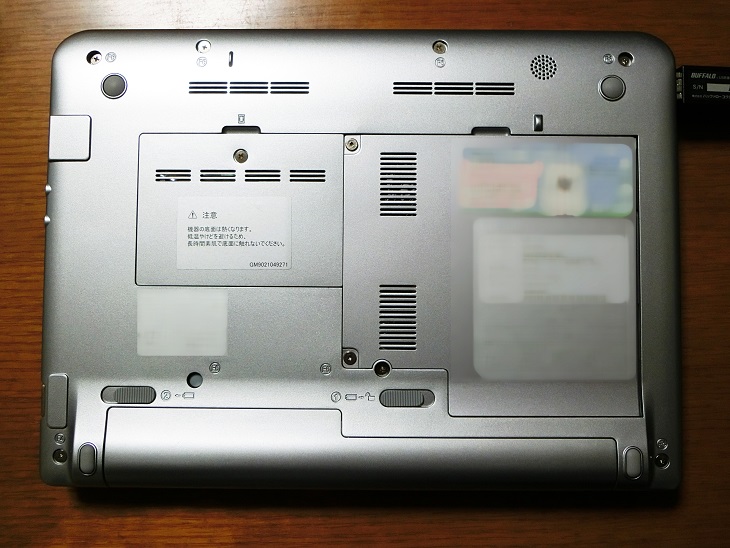
まずはHDDの確認。<br />
<br />
<br />
<img width="468" src="//win8.no-mania.com/File/fa2893e9.jpeg" alt="" /><br />
<br />
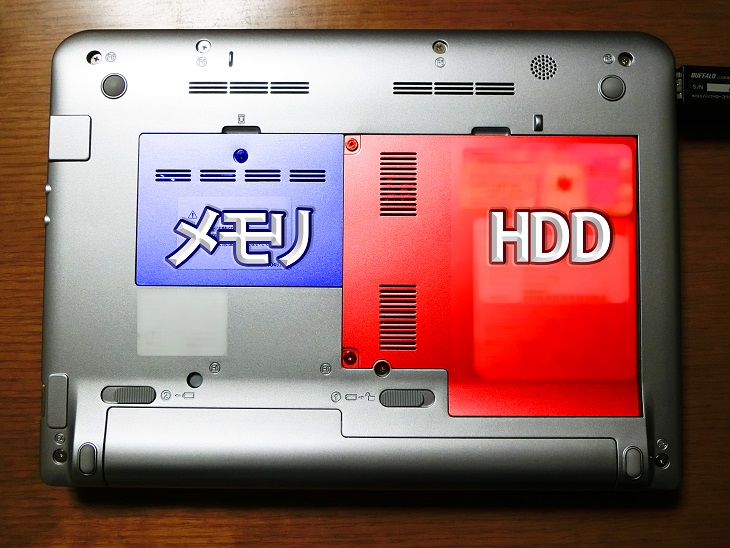
青色部分にメモリがあり<br />
赤色部分にHDDがある。<br />
<br />
<br />

<table style="border-style: none;">
<tbody>
<tr style="border-style: none;">
<td style="border-style: none;"><img width="300" src="//win8.no-mania.com/File/44c36322.jpeg" alt="" /></td>
<td style="border-style: none;"><img width="300" src="//win8.no-mania.com/File/68a7130e.jpeg" alt="" /></td>
</tr>
</tbody>
</table>
<br />
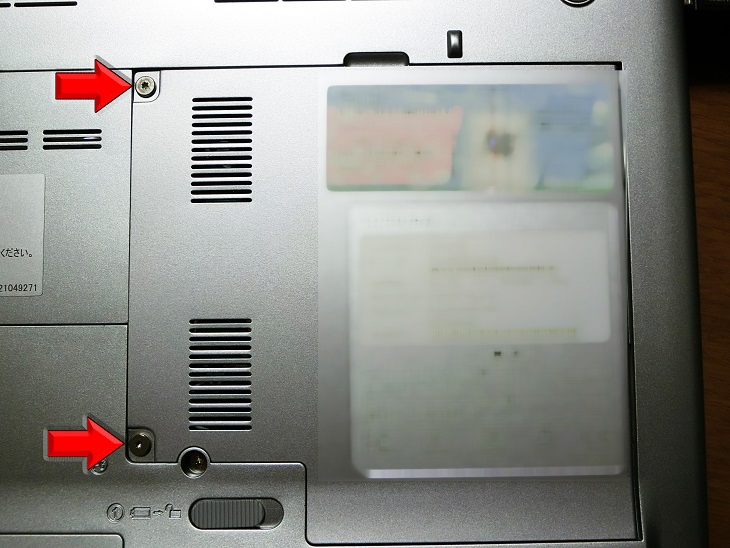
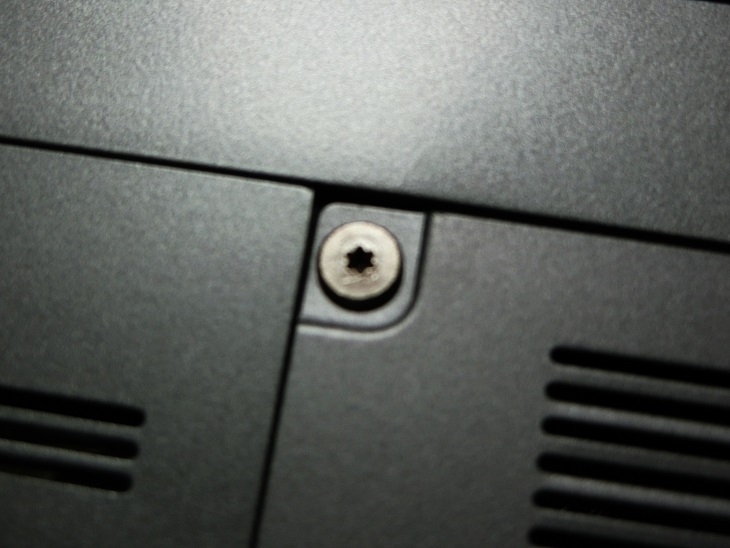
メモリの蓋は普通のネジだが<br />
HDDのの蓋はトルクスネジというちょっと特殊なネジになっている（星型）<br />
<br />
<br />
<a rel="nofollow" href="http://www.amazon.co.jp/gp/product/B00BUVLQ8I/ref=as_li_qf_sp_asin_il?ie=UTF8&amp;camp=247&amp;creative=1211&amp;creativeASIN=B00BUVLQ8I&amp;linkCode=as2&amp;tag=diyratio-22"><img border="0" src="http://ws-fe.amazon-adsystem.com/widgets/q?_encoding=UTF8&amp;ASIN=B00BUVLQ8I&amp;Format=_SL250_&amp;ID=AsinImage&amp;MarketPlace=JP&amp;ServiceVersion=20070822&amp;WS=1&amp;tag=diyratio-22" /></a><img src="http://ir-jp.amazon-adsystem.com/e/ir?t=diyratio-22&amp;l=as2&amp;o=9&amp;a=B00BUVLQ8I" width="1" height="1" border="0" alt="" style="border: none !important; margin: 0px !important;" /><br />
<br />
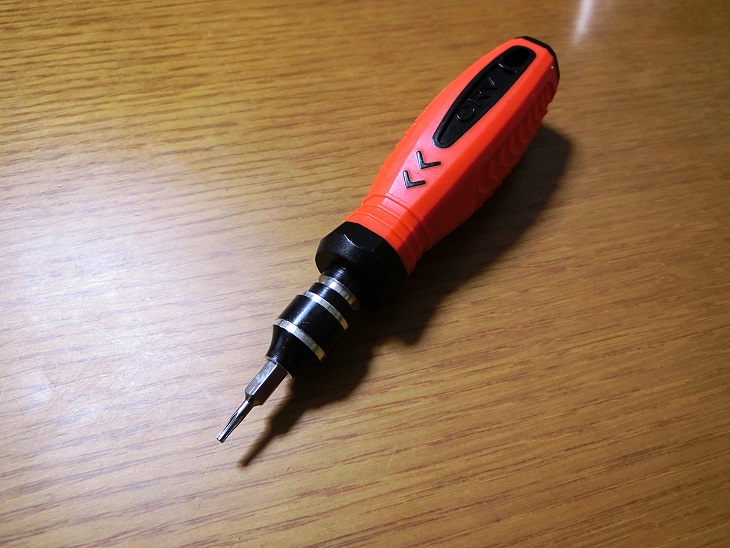
手持ちのトルクスドライバーに合うサイズが無かったため<br />
アマゾンで36ピット付きで送料込み950円とお買い得だった<br />
<a rel="nofollow" href="http://www.amazon.co.jp/gp/product/B00BUVLQ8I/ref=as_li_qf_sp_asin_tl?ie=UTF8&amp;camp=247&amp;creative=1211&amp;creativeASIN=B00BUVLQ8I&amp;linkCode=as2&amp;tag=diyratio-22"><span style="text-decoration: underline;">精密ドライバーセット</span></a><img src="http://ir-jp.amazon-adsystem.com/e/ir?t=diyratio-22&amp;l=as2&amp;o=9&amp;a=B00BUVLQ8I" width="1" height="1" border="0" alt="" style="border: none !important; margin: 0px !important;" />を発注。<br />
<br />
<br />
<img width="468" src="//win8.no-mania.com/File/d9f07cda.jpeg" alt="" /><br />
<br />
T6のピットを付けたドライバーでトルクスネジを外し<br />
<br />
<br />
<img width="468" src="//win8.no-mania.com/File/892550d0.jpeg" alt="" /><br />
<br />
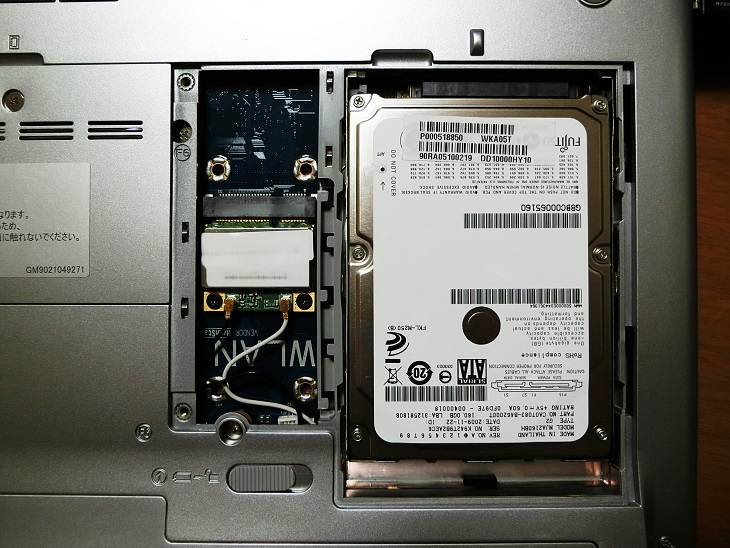
蓋を開けるとHDDがお目見え。<br />
2.5インチHDD（SATA接続）を確認したので<br />
SSD換装に問題なし。<br />
<br />
<br />
<img width="468" src="//win8.no-mania.com/File/2f7cf1b8.jpeg" alt="" /><br />
<br />
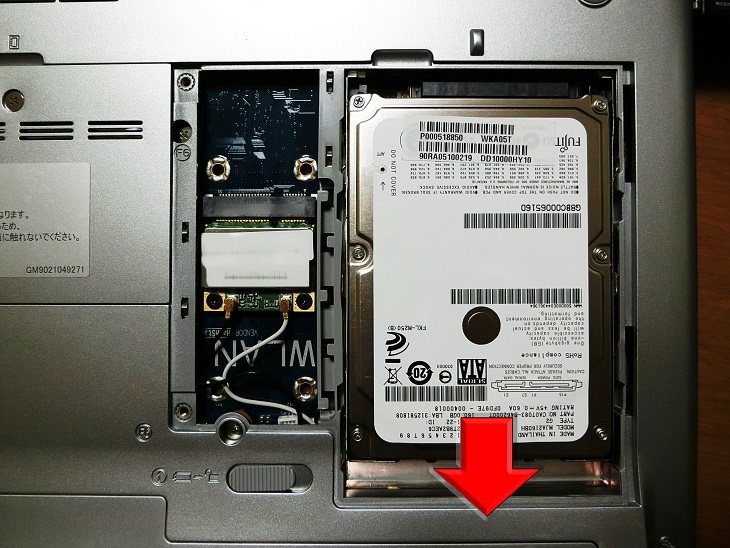
HDDは矢印方向にスライドさせると取り外せる。<br />
<br />
<br />
<img width="468" src="//win8.no-mania.com/File/6bd37701.jpeg" alt="" /><br />
<br />
取り外したHDDから<br />
<br />
<br />
<img width="468" src="//win8.no-mania.com/File/aa80ddbe.jpeg" alt="" /><br />
<br />
カバーを外せば準備完了。<br />
<br />
<br />
■関連記事（サブdynabook）<br />
<a href="http://win8.no-mania.com/ssd/ssd_dynabook1" title="" target="_blank"><span style="text-decoration: underline;">（1）～確認編～</span></a><br />
<a href="http://win8.no-mania.com/ssd/ssd_dynabook2" title="" target="_blank"><span style="text-decoration: underline;">（2）～インストールメディア作成編～</span></a><br />
<a href="http://win8.no-mania.com/ssd/ssd_dynabook3" title="" target="_blank"><span style="text-decoration: underline;">（3）～SSD取り付け編～</span></a><br />
<a href="http://win8.no-mania.com/ssd/ssd_dynabook4" title="" target="_blank"><span style="text-decoration: underline;">（4）～win10クリーンインストール編～</span></a><br />
<a href="http://win8.no-mania.com/ssd/ssd_dynabook5" title="" target="_blank"><span style="text-decoration: underline;">（5）～転送速度確認編～</span></a><br />
<a href="http://win8.no-mania.com/ssd/ssd_dynabook_samsungmagician" title="" target="_blank"><span style="text-decoration: underline;">（番外編1）～ネットブックでSamsung Magicianを使う方法～</span></a><br />
<a href="http://win8.no-mania.com/ssd/ssd_samsungssd_weight" title="" target="_blank"><span style="text-decoration: underline;">（番外編2）～Samsung SSDの重さを量ってみた～</span></a><br />
<br />
■関連記事（メインPC）<br />
<a href="http://win8.no-mania.com/ssd/ssd_1" title="" target="_self"><span style="text-decoration: underline;">（1）～確認編～</span></a><br />
<a href="http://win8.no-mania.com/ssd/ssd_2" title="" target="_self"><span style="text-decoration: underline;">（2）～SSD選び編～</span></a><br />
<a href="http://win8.no-mania.com/ssd/ssd_3" title="" target="_self"><span style="text-decoration: underline;">（3）～SSD取り付け編～</span></a><br />
<a href="http://win8.no-mania.com/ssd/ssd_4" title="" target="_self"><span style="text-decoration: underline;">（4）～クローン作成編～</span></a><br />
<a href="http://win8.no-mania.com/ssd/ssd_5" title="" target="_self"><span style="text-decoration: underline;">（5）～転送速度確認編～</span></a><br />
<a href="http://win8.no-mania.com/ssd/ssd_6" title="" target="_self"><span style="text-decoration: underline;">（6）～急転直下編～</span></a><br />
<a href="http://win8.no-mania.com/ssd/wd10ezex" title="" target="_self"><span style="text-decoration: underline;">（番外編）HDDの転送速度を計ってみた</span></a><br />
<br />

<script async="" src="//pagead2.googlesyndication.com/pagead/js/adsbygoogle.js" type="text/javascript"></script>
<!-- 忍者ブログ四角（小） --> <ins class="adsbygoogle" style="display: inline-block; width: 300px; height: 250px;" data-ad-client="ca-pub-9590588813454524" data-ad-slot="3378225444"></ins>
<script type="text/javascript">(adsbygoogle = window.adsbygoogle || []).push({});</script>]]></content:encoded>
    <dc:subject>SSD換装</dc:subject>
    <dc:date>2016-01-08T02:15:55+09:00</dc:date>
    <dc:creator>No Name Ninja</dc:creator>
    <dc:publisher>NINJA BLOG</dc:publisher>
    <dc:rights>No Name Ninja</dc:rights>
  </item>
</rdf:RDF>